
17 – Dev Console: SusConsoleService, SusConsoleDriver
Service:
SusConsoleService(sus-core/Runtime/Services/) Driver:SusConsoleDriver(sus-core/Runtime/Services/)
1. Purpose
An in-game dev console: intercepts Unity logs and displays them on top of the entire UI (category Console = 50 - the very top), lets you filter/search, and run commands. The main use case is debugging on a device/build without the Editor Console.
2. Setup
Wrap in #if to exclude it from release builds:
#if DEVELOPMENT_BUILD || UNITY_EDITOR
var overlay = SusBootstrap.GetOrCreateOverlay(uiDocument.rootVisualElement);
var console = new SusConsoleService
{
    OverlayHost = overlay,
    ToggleKey = KeyCode.BackQuote, // ~
    MaxEntries = 500,
};
console.Attach(); // subscribes to the log, spawns the hotkey driver, sets Instance
#endif
Attach() does four things:
- Subscribes to
Application.logMessageReceivedThreaded. - Creates (or finds) a
SusConsoleDriverto pollToggleKeyinUpdate. - Registers the built-in commands (
clear,help,filter). - Publishes the instance as
SusConsoleService.Instance(the setter is private - don't assign it directly).
Detach() unsubscribes from the log and hides the UI.
3. Usage
User interface
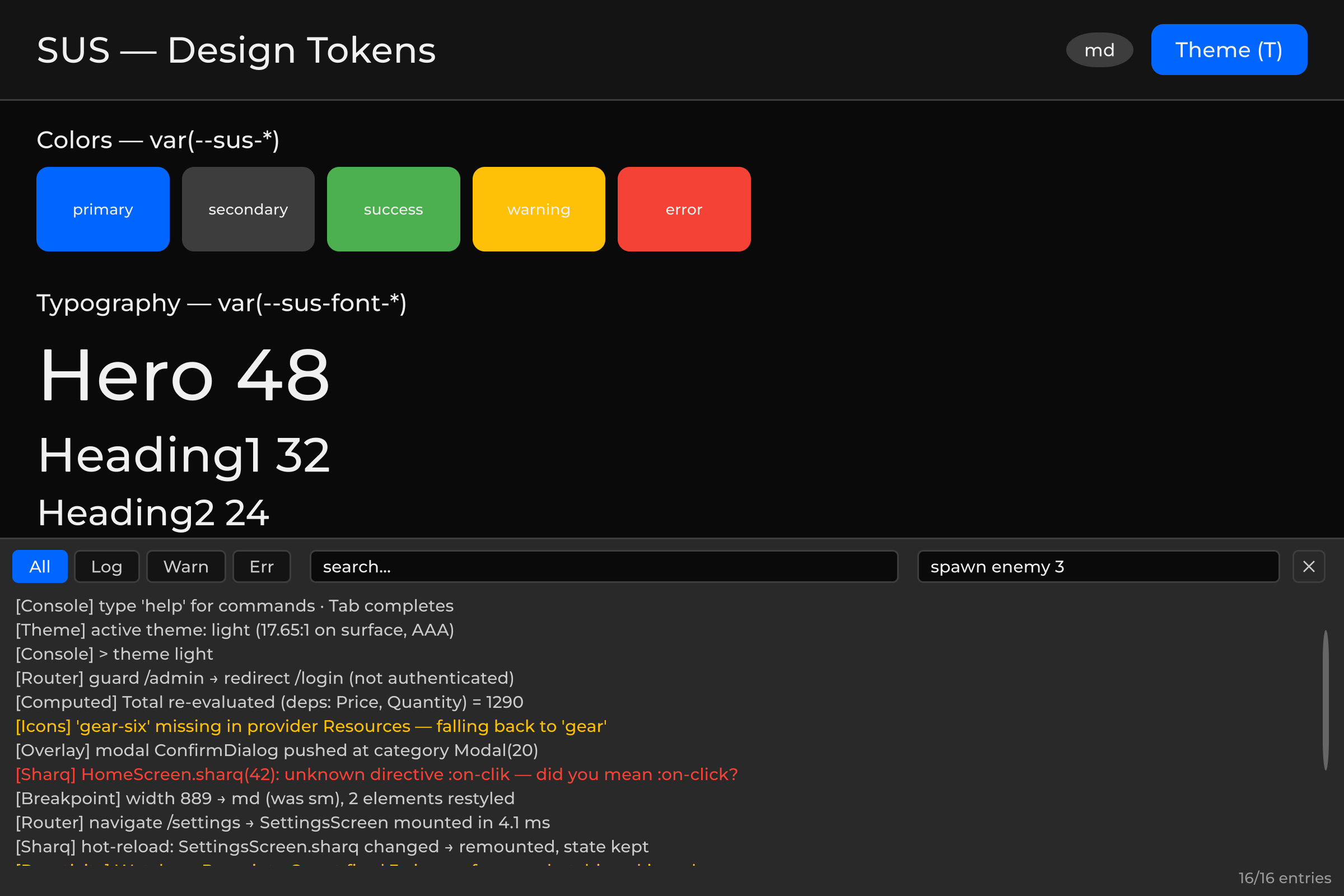
Pressing ~ opens the console from the bottom (40% of the screen height), a dark panel:
| Element | Description |
|---|---|
| Buttons All / Log / Warn / Err | Filter by type |
| Search field | Filter by substring (case-insensitive) |
| Command input field | Type a command → Enter → execute |
| Tab in the command field | Command name completion |
| ✕ | Close the console |
Colored logs: gray (Log), yellow (Warning), red (Error/Exception/Assert). Auto-scrolls down for new messages; scrolling up manually stops the auto-scroll.
Styling
The console has no inline C# styles: the whole overlay is described by Runtime/Resources/SusRuntime/sus-console.uss, which the service loads onto its own root on the first Show(). Colors come from design tokens (--sus-bg-overlay, --sus-primary, --sus-warning, --sus-error, …), so the console follows the active theme.
To restyle it, override the classes in any sheet loaded after the console's own (a project sheet on the panel, or SusBootstrap.RegisterCascadeStyleSheet):
| Class | Element |
|---|---|
.sus-console | Overlay panel (position, height, background) |
.sus-console__toolbar | Top row |
.sus-console__filter / --active | Filter chips All / Log / Warn / Err |
.sus-console__field + __search / __command | Text inputs |
.sus-console__close | ✕ button |
.sus-console__list | ScrollView with log lines |
.sus-console__line + --warning / --error | Log line |
.sus-console__status | Bottom status line (filter + entry count) |
Every var() in the sheet carries a fallback, so the console still looks right on a bare panel that never went through SusBootstrap and has no token cascade.
Registering commands
#if DEVELOPMENT_BUILD || UNITY_EDITOR
SusConsoleService.Instance.RegisterCommand("spawn", args =>
{
    if (args.Length > 0)
        SpawnUnit(args[0]);
    else
        Debug.Log("Usage: spawn <unitId>");
}, help: "Spawn a unit by id");

SusConsoleService.Instance.RegisterCommand("gold", args =>
{
    int amount = args.Length > 0 ? int.Parse(args[0]) : 1000;
    player.Gold += amount;
    Debug.Log($"Added {amount} gold. Total: {player.Gold}");
}, help: "Add gold (default 1000)");
#endif
Built-in commands (registered automatically in Attach):
| Command | Description |
|---|---|
clear | Clear the log buffer |
help | List all commands |
filter <all|log|warn|error> | Toggle the filter |
4. Architecture
Thread safety
Application.logMessageReceivedThreaded can be called from a background thread. Entries are appended to a Queue<SusLogEntry> under a lock, and SusConsoleDriver.Update() calls DrainPendingEntries() on the main thread - it moves records into the ring buffer and updates the UI.
Ring buffer
When it overflows (MaxEntries, default 500), old entries are evicted:
if (_buffer.Count >= MaxEntries)
    _buffer.RemoveAt(0);
_buffer.Add(entry);
Lazy UI construction
The UI (_root, _scrollView, toolbar, command field) is built on the first Show(). While closed, the console creates no VisualElements - zero rendering overhead.
Z-order
OverlayCategory.Console = 50 — the top layer of the screen-space OverlayHost. The console is always above modals, tooltips, dropdowns, and toasts.
World-space UI (health bars) is not part of this stack: it uses a separate panel under the screens. See 07-overlayhost.md.
World-space panel                         ← UNDER screens (not OverlayHost)
└── healthbar / nameplate / …

Screen UIDocument
├── SusRouteView                          ← screens
└── OverlayHost
     ├── [Transition = 10]
     ├── [Modal      = 20]
     ├── [Tooltip    = 30]  ← above modals
     ├── [Dropdown   = 40]
     ├── [Toast      = 45]
     └── [Console    = 50]  ← console here (topmost)
5. API
SusConsoleService
| Method/Property | Type | Description |
|---|---|---|
Attach() | void | Log subscription + hotkey driver |
Detach() | void | Unsubscribe + close |
Show() | void | Show the console |
Hide() | void | Hide it |
Toggle() | void | Toggle it |
Clear() | void | Clear the buffer |
DrainPendingEntries() | void | Move records from the queue to the buffer (main thread) |
SetFilter(filter) | void | ConsoleFilter.All/Log/Warning/Error |
SetSearch(text) | void | Filter by substring |
RegisterCommand(name, handler, help) | void | Register a command |
ExecuteCommand(input) | bool | Execute a command line |
IsOpen | bool | Whether the console is open |
OverlayHost | OverlayHost | Portal container |
ToggleKey | KeyCode | Hotkey (default ~) |
MaxEntries | int | Ring buffer size (500) |
Instance | static SusConsoleService | Singleton |
SusConsoleDriver
public class SusConsoleDriver : MonoBehaviour
{
    public SusConsoleService Service;

    private void Update()
    {
        if (Input.GetKeyDown(Service.ToggleKey))
            Service.Toggle();
        Service.DrainPendingEntries();
    }
}
SusLogEntry
Ring-buffer row for the overlay console (what SusConsoleService stores after intercepting Unity logs). Not the process-wide gated logger SusLog / SusLogLevel — see 11-api-reference.
public struct SusLogEntry
{
    public LogType Type;        // Log, Warning, Error, Exception, Assert
    public string Message;      // Text
    public string StackTrace;   // Stack (for errors)
    public float Time;          // Time.unscaledTime
}
ConsoleFilter
public enum ConsoleFilter { All, Log, Warning, Error }6. Tests
| File | Tests | What it covers |
|---|---|---|
sus-core/Runtime/Tests/SusConsoleServiceTests.cs | 10 playmode | Show/Hide/Toggle, log interception, buffer overflow, filter, search, RegisterCommand/ExecuteCommand, Clear |