
SusHudItemStrip
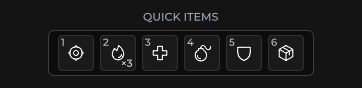
Ряд расходников / quick-item — icon + count на слот, фокус стрелками, activate-callback.
Пакет
SusGame · HUD (коммерческий)
Свойства
| Имя | Тип | По умолчанию | |
|---|---|---|---|
SlotCount | Prop<int> | 5 |
Слоты
Слотов нет.
События
| Имя | Поле | Payload |
|---|---|---|
ItemActivated | OnItemActivated | int |
Хуки стиля
Контракт USS-классов — внешний вид переопределяется без правки C#. Состояния переключаются этими классами:
sus-hiddensus-hud-item-stripsus-hud-item-strip__countsus-hud-item-strip__iconsus-hud-item-strip__keysus-hud-item-strip__slot
Использование
csharp
var strip = new SusHudItemStrip();
strip.SlotCount.Value = 5;
strip.OnItemActivated += index => { /* consume / equip */ };

strip.SetItem(0, "potion", "3");
strip.SetItem(1, "bandages", "12");
strip.SetItem(2, "flare", "1");
xml
<template>
  <sus:SusHudItemStrip :SlotCount="Slots.Value"
                       @item-activated="OnItemActivated" />
</template>

<script>
public Prop<int> Slots = new(5);
void OnItemActivated(int index) { /* … */ }
// Call SetItem after mount (slots rebuild on SlotCount).
</script>| Prop / API | Роль |
|---|---|
SlotCount | Слоты 1…12 (по умолчанию 5) |
SetItem(i, icon, countText?) | Заполняет один слот |
OnItemActivated | Индекс клика / активации |
Заметки
- Иконки пусты, пока не вызван
SetItem— заполняйте после монтирования, как у SusHotbar. - Клавиатура: Left/Right двигают фокус; активация по клику (и через host key wiring).
- Предпочитайте hotbar, когда нужны keybind-цифры + selection chrome; item strip — более плотный ряд с count-бейджами.