
SusHudItemStrip
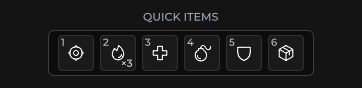
消耗品 / 快捷道具行 — 每个槽位一个图标 + 数量,方向键聚焦,激活回调。
包
SusGame · HUD(商业)
属性
| 名称 | 类型 | 默认值 | |
|---|---|---|---|
SlotCount | Prop<int> | 5 |
插槽
没有插槽。
事件
| 名称 | 字段 | 载荷 |
|---|---|---|
ItemActivated | OnItemActivated | int |
样式钩子
USS 类契约 — 无需改 C# 即可覆盖外观。状态通过这些类切换:
sus-hiddensus-hud-item-stripsus-hud-item-strip__countsus-hud-item-strip__iconsus-hud-item-strip__keysus-hud-item-strip__slot
用法
csharp
var strip = new SusHudItemStrip();
strip.SlotCount.Value = 5;
strip.OnItemActivated += index => { /* consume / equip */ };

strip.SetItem(0, "potion", "3");
strip.SetItem(1, "bandages", "12");
strip.SetItem(2, "flare", "1");
xml
<template>
  <sus:SusHudItemStrip :SlotCount="Slots.Value"
                       @item-activated="OnItemActivated" />
</template>

<script>
public Prop<int> Slots = new(5);
void OnItemActivated(int index) { /* … */ }
// Call SetItem after mount (slots rebuild on SlotCount).
</script>| Prop / API | 作用 |
|---|---|
SlotCount | 槽位数 1…12(默认 5) |
SetItem(i, icon, countText?) | 填充单个槽位 |
OnItemActivated | 点击 / 激活的索引 |
备注
- 图标为空,直到调用
SetItem—— 与 SusHotbar 一样,在挂载之后再填充。 - 键盘操作:左 / 右方向键移动焦点;通过点击激活(也可由宿主接入按键)。
- 需要数字键绑定 + 选中态外观时优先使用 hotbar;item strip 是更密集的数量徽标行。