
SusInventoryItem
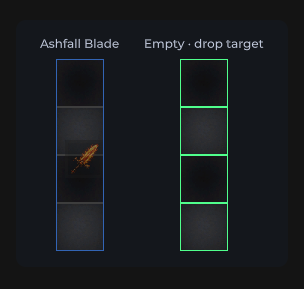
Предмет на сетке: иконка, rarity-рамка, stack, durability, drag & drop, context menu.
Пакет
SusGame · Инвентарь (коммерческий)
Свойства
| Имя | Тип | По умолчанию | |
|---|---|---|---|
Icon | Prop<string> | "" | v-model |
Rarity | Prop<string> | "common" | v-model |
StackCount | Prop<int> | 1 | v-model |
Durability | Prop<float> | 100f | v-model |
IsEquipped | Prop<bool> | false | v-model |
IsDragging | Prop<bool> | false | v-model |
IsSelected | Prop<bool> | false | v-model |
ShowName | Prop<bool> | false | v-model |
ItemName | Prop<string> | "" | v-model |
MediaMode | Prop<string> | "image" | v-model |
Слоты
События
| Имя | Поле | Payload |
|---|---|---|
DragStart | OnDragStart | SusInventoryItem |
DragEnd | OnDragEnd | SusInventoryItem |
Dragging | OnDragging | SusInventoryItem, Vector2 |
ItemClicked | OnItemClicked | SusInventoryItem |
ContextAction | OnContextAction | string, SusInventoryItem |
Хуки стиля
Контракт USS-классов — внешний вид переопределяется без правки C#. Состояния переключаются этими классами:
sus-hiddensus-imgsus-img__errorsus-img__placeholdersus-img__surfacesus-img--rounded-mdsus-img--rounded-smsus-inv-ghostsus-inv-ghost__glyphsus-inv-ghost__imagesus-inv-ghost__stacksus-inv-ghost--commonsus-inv-ghost--epicsus-inv-ghost--exoticsus-inv-ghost--legendarysus-inv-ghost--raresus-inv-ghost--uncommonsus-inventory-itemsus-inventory-item__durability-fillsus-inventory-item__durability-fill--goodsus-inventory-item__durability-fill--lowsus-inventory-item__durability-fill--warnsus-inventory-item__durability-tracksus-inventory-item__glyphsus-inventory-item__imagesus-inventory-item__namesus-inventory-item__raritysus-inventory-item__stacksus-inventory-item__tipsus-inventory-item--draggingsus-inventory-item--equippedsus-inventory-item--long-presssus-inventory-item--media-iconsus-inventory-item--media-imagesus-inventory-item--rarity-commonsus-inventory-item--rarity-epicsus-inventory-item--rarity-exoticsus-inventory-item--rarity-legendarysus-inventory-item--rarity-raresus-inventory-item--rarity-uncommonsus-inventory-item--selectedsus-tooltip--inventory
Использование
Предпочитайте родительский SusInventory через SusInventorySession — не размещайте предметы-сироты без сетки/модели. Отрисовка сетки задаёт Item / Def / props иконки автоматически.
// Session mounts SusInventory; items get Def + DnD + tooltip automatically
var session = SusInventorySession.Attach(host);
session.Configure(SusInventorySystemParams.PackedGrid);
session.SetCatalog(defs);
session.SeedItems(seeds);
session.Apply();
Отдельный chrome (Storybook / кастомная иконка):
var item = new SusInventoryItem();
item.Icon.Value = "SusGameDemo/Items/sword";
item.Rarity.Value = "rare";
item.StackCount.Value = 3;
item.Durability.Value = 72f;
item.MediaMode.Value = "image"; // image | icon
item.IsEquipped.Value = false;
item.IsSelected.Value = false;
item.Def = itemDef;             // tooltip content
item.OnItemClicked += ii => { /* select */ };
item.OnContextAction += (action, ii) => { /* equip|unequip|delete */ };<template>
<sus:SusInventoryItem :Icon="Icon.Value"
:Rarity="Rarity.Value"
:StackCount="Stack.Value"
:Durability="Dura.Value"
:MediaMode="Media.Value"
:IsEquipped="Eq.Value"
:IsSelected="Sel.Value" />
</template>
<script>
public Prop<string> Icon = new("SusGameDemo/Items/sword");
public Prop<string> Rarity = new("rare");
public Prop<int> Stack = new(3);
public Prop<float> Dura = new(72f);
public Prop<string> Media = new("image");
public Prop<bool> Eq = new(false);
public Prop<bool> Sel = new(false);
</script>| Prop / API | Роль |
|---|---|
Icon | Путь в Resources (image) или ключ icon-set (MediaMode=icon) |
Rarity | common…exotic → BEM --rarity-* |
StackCount | Бейдж при > 1 |
Durability | 0…100; полоса скрыта при 100 |
IsEquipped / IsDragging / IsSelected | Классы состояния |
MediaMode | image (заливка SusImg) | icon (глиф SusIcon) |
Item / Def | Ссылки на модель (tooltip + идентичность DnD) |
ShowName | Показывает плашку sus-inventory-item__name (текст из Def.Name, иначе Def.Id). По умолчанию false — существующие раскладки сохраняют свой вид |
OnDrag* / OnItemClicked / OnContextAction | Указатель и меню |
Всплывающая подсказка
Использует SusTooltip (слой Tooltip в OverlayHost). Нативный UITK tooltip очищается. Содержимое берётся из ItemDef (name, rarity · category · subcategory, description, weight, modifiers). Тайминг / строки: родительский SusInventorySystemParams.
Корень подсказки — hover-триггер (у предмета инвентаря это обёртка #ItemTip на всю ячейку), а не карточка. Он несёт sus-item-tooltip__trigger и сохраняет sus-item-tooltip. Карточка несёт sus-item-tooltip__card и сохраняет его после переезда в overlay-хост. Оформляйте карточку через .sus-item-tooltip__card, тогда правило карточки никогда не попадёт на ячейку:
.sus-item-tooltip__card { min-width: 280px; }
.sus-item-tooltip__card .sus-tooltip__header { padding: 8px 12px; }
.sus-item-tooltip__trigger { /* the cell wrapper, if you need it */ }
Части карточки — унаследованные элементы SusTooltip (__header, __header-title, __header-type, __hero, __bars, __footer), к ним обращаются как .sus-item-tooltip__card .sus-tooltip__<part>.
Заметки
- Контекстные действия:
equip|unequip|delete. - Порог перетаскивания / ghost host берутся из родительской сетки / shell — задайте
GhostHostперед DnD. - Предпочитайте Session предметам-сиротам, чтобы rarity / tooltip / DnD оставались согласованными.