
SusInventoryItem
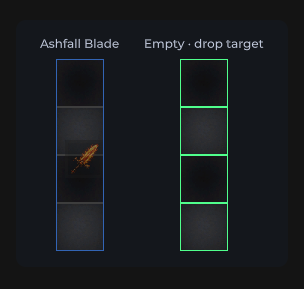
网格中的物品:图标、稀有度边框、堆叠数、耐久度、拖放、右键菜单。
包
SusGame · 库存(商业)
属性
| 名称 | 类型 | 默认值 | |
|---|---|---|---|
Icon | Prop<string> | "" | v-model |
Rarity | Prop<string> | "common" | v-model |
StackCount | Prop<int> | 1 | v-model |
Durability | Prop<float> | 100f | v-model |
IsEquipped | Prop<bool> | false | v-model |
IsDragging | Prop<bool> | false | v-model |
IsSelected | Prop<bool> | false | v-model |
ShowName | Prop<bool> | false | v-model |
ItemName | Prop<string> | "" | v-model |
MediaMode | Prop<string> | "image" | v-model |
插槽
没有插槽。
事件
| 名称 | 字段 | 载荷 |
|---|---|---|
DragStart | OnDragStart | SusInventoryItem |
DragEnd | OnDragEnd | SusInventoryItem |
Dragging | OnDragging | SusInventoryItem, Vector2 |
ItemClicked | OnItemClicked | SusInventoryItem |
ContextAction | OnContextAction | string, SusInventoryItem |
样式钩子
USS 类契约 — 无需改 C# 即可覆盖外观。状态通过这些类切换:
sus-hiddensus-imgsus-img__errorsus-img__placeholdersus-img__surfacesus-img--rounded-mdsus-img--rounded-smsus-inv-ghostsus-inv-ghost__glyphsus-inv-ghost__imagesus-inv-ghost__stacksus-inv-ghost--commonsus-inv-ghost--epicsus-inv-ghost--exoticsus-inv-ghost--legendarysus-inv-ghost--raresus-inv-ghost--uncommonsus-inventory-itemsus-inventory-item__durability-fillsus-inventory-item__durability-fill--goodsus-inventory-item__durability-fill--lowsus-inventory-item__durability-fill--warnsus-inventory-item__durability-tracksus-inventory-item__glyphsus-inventory-item__imagesus-inventory-item__namesus-inventory-item__raritysus-inventory-item__stacksus-inventory-item__tipsus-inventory-item--draggingsus-inventory-item--equippedsus-inventory-item--long-presssus-inventory-item--media-iconsus-inventory-item--media-imagesus-inventory-item--rarity-commonsus-inventory-item--rarity-epicsus-inventory-item--rarity-exoticsus-inventory-item--rarity-legendarysus-inventory-item--rarity-raresus-inventory-item--rarity-uncommonsus-inventory-item--selectedsus-tooltip--inventory
用法
优先通过 SusInventorySession 使用父组件 SusInventory — 不要在没有网格 / model 的情况下放置孤立物品。网格绘制会自动设置 Item / Def / icon 属性。
csharp
// Session mounts SusInventory; items get Def + DnD + tooltip automatically
var session = SusInventorySession.Attach(host);
session.Configure(SusInventorySystemParams.PackedGrid);
session.SetCatalog(defs);
session.SeedItems(seeds);
session.Apply();
独立外观(Storybook / 自定义图标):
csharp
var item = new SusInventoryItem();
item.Icon.Value = "SusGameDemo/Items/sword";
item.Rarity.Value = "rare";
item.StackCount.Value = 3;
item.Durability.Value = 72f;
item.MediaMode.Value = "image"; // image | icon
item.IsEquipped.Value = false;
item.IsSelected.Value = false;
item.Def = itemDef;             // tooltip content
item.OnItemClicked += ii => { /* select */ };
item.OnContextAction += (action, ii) => { /* equip|unequip|delete */ };
xml
<template>
  <sus:SusInventoryItem :Icon="Icon.Value"
                        :Rarity="Rarity.Value"
                        :StackCount="Stack.Value"
                        :Durability="Dura.Value"
                        :MediaMode="Media.Value"
                        :IsEquipped="Eq.Value"
                        :IsSelected="Sel.Value" />
</template>

<script>
public Prop<string> Icon = new("SusGameDemo/Items/sword");
public Prop<string> Rarity = new("rare");
public Prop<int> Stack = new(3);
public Prop<float> Dura = new(72f);
public Prop<string> Media = new("image");
public Prop<bool> Eq = new(false);
public Prop<bool> Sel = new(false);
</script>| Prop / API | 作用 |
|---|---|
Icon | Resources 路径(图片)或图标集 key(MediaMode=icon) |
Rarity | common…exotic → BEM --rarity-* |
StackCount | > 1 时显示徽章 |
Durability | 0…100;为 100 时隐藏进度条 |
IsEquipped / IsDragging / IsSelected | 状态类 |
MediaMode | image(SusImg 填充)| icon(SusIcon 字形) |
Item / Def | Model 引用(tooltip + 拖放身份) |
ShowName | 显示 sus-inventory-item__name 名称牌(文字取自 Def.Name,否则为 Def.Id)。默认 false——现有布局保持原样 |
OnDrag* / OnItemClicked / OnContextAction | 指针与菜单 |
悬停提示
使用 SusTooltip(OverlayHost Tooltip 图层)。原生 UITK 的 tooltip 会被清除。 内容来自 ItemDef(名称、稀有度 · 分类 · 子分类、描述、重量、修饰符)。 时机 / 行数由父组件 SusInventorySystemParams 决定。
提示的根节点是悬停触发器——对库存物品而言,是覆盖整个格子的 #ItemTip 包装元素——而不是卡片。它带有 sus-item-tooltip__trigger,并保留 sus-item-tooltip。卡片带有 sus-item-tooltip__card,移入 overlay 宿主后仍保留该类。请通过 .sus-item-tooltip__card 设置卡片样式,这样卡片规则永远不会落到格子上:
css
.sus-item-tooltip__card { min-width: 280px; }
.sus-item-tooltip__card .sus-tooltip__header { padding: 8px 12px; }
.sus-item-tooltip__trigger { /* the cell wrapper, if you need it */ }
卡片的各部分是继承自 SusTooltip 的元素(__header、__header-title、__header-type、__hero、__bars、__footer),通过 .sus-item-tooltip__card .sus-tooltip__<part> 访问。
备注
- 上下文操作:
equip|unequip|delete。 - 拖动阈值 / ghost host 来自父级网格 / 外壳 — 在拖放前设置
GhostHost。 - 优先使用 Session 而非孤立物品,以保持 rarity / tooltip / 拖放的一致性。