
SusHudUnitCard
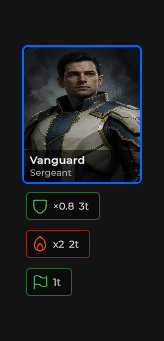
战术单位头像——图片或图标回退,名字 / 军衔覆层,状态效果行;点击可选中。
包
SusGame · HUD(商业)
属性
| 名称 | 类型 | 默认值 | |
|---|---|---|---|
UnitId | Prop<string> | "" | |
UnitName | Prop<string> | "" | |
Rank | Prop<string> | "" | |
ImageSrc | Prop<string> | "" | |
Icon | Prop<string> | "" | |
Active | Prop<bool> | false | |
Ally | Prop<bool> | true | |
Hp | Prop<float> | 0f | |
MaxHp | Prop<float> | 0f | |
EffectsPlacement | Prop<string> | "below" | |
EffectSize | Prop<string> | "auto" | |
NameWrap | Prop<string> | "wrap" |
插槽
没有插槽。
事件
| 名称 | 字段 | 载荷 |
|---|---|---|
Selected | OnSelected | SusHudUnitCard |
样式钩子
USS 类契约 — 无需改 C# 即可覆盖外观。状态通过这些类切换:
breakpoint-smsus-hiddensus-hud-unit-cardsus-hud-unit-card__active-linesus-hud-unit-card__effectssus-hud-unit-card__fallbacksus-hud-unit-card__imgsus-hud-unit-card__namesus-hud-unit-card__name-linesus-hud-unit-card__name-linessus-hud-unit-card__overlaysus-hud-unit-card__portraitsus-hud-unit-card__ranksus-hud-unit-card--activesus-hud-unit-card--allysus-hud-unit-card--effects-abovesus-hud-unit-card--enemysus-hud-unit-card--name-words
用法
通过 props 驱动,或用 ApplyData / SetEffects 填充(rail 使用的是数据路径)。
csharp
var card = new SusHudUnitCard();
card.ApplyData(new SusHudUnitCardData
{
    Id = "u1",
    Name = "Mara",
    Rank = "Sergeant",
    ImageSrc = "portraits/mara",
    Icon = "",
    Active = true,
    Ally = true,
    Hp = 42f,
    MaxHp = 50f,
    Effects = new List<SusStatusEffectData>
    {
        new() { Id = "regen", Icon = "heart", Title = "Regen", Stacks = 2, TurnsLeft = 3 },
    },
});
card.OnSelected += c => { /* focus unit */ };
xml
<template>
  <sus:SusHudUnitCard :UnitId="Id.Value"
                      :UnitName="Name.Value"
                      :Rank="Rank.Value"
                      :ImageSrc="Img.Value"
                      :Icon="Icon.Value"
                      :Active="Active.Value"
                      :Ally="Ally.Value"
                      :Hp="Hp.Value"
                      :MaxHp="MaxHp.Value"
                      @selected="OnSelected" />
</template>

<script>
public Prop<string> Id = new("u1");
public Prop<string> Name = new("Mara");
public Prop<string> Rank = new("Sergeant");
public Prop<string> Img = new("portraits/mara");
public Prop<string> Icon = new("");
public Prop<bool> Active = new(true);
public Prop<bool> Ally = new(true);
public Prop<float> Hp = new(42f);
public Prop<float> MaxHp = new(50f);
void OnSelected(SusHudUnitCard card) { /* … */ }
// Prefer ApplyData + SetEffects when syncing from combat state.
</script>| Prop / API | Role |
|---|---|
UnitId | 稳定 id(rail 对账用的 key) |
UnitName · Rank | 覆层文本 |
ImageSrc | 头像目录 key(SusGameMedia) |
Icon | 图片为空时的回退图标 key |
Active | 放大的 --active 外框;effect 尺寸切换 normal / mini |
Ally | 友军 / 敌军边框样式 |
Hp · MaxHp | 仅用于 tooltip(MaxHp ≤ 0 时隐藏 HP 行) |
ApplyData(SusHudUnitCardData) | 完整同步 + effects |
SetEffects / ClearEffects | 状态行(SusStatusEffect) |
OnSelected | 载荷 = 当前卡片 |
EffectsPlacement | "below"(默认)或 "above" |
EffectSize | "auto"(默认)、"mini" 或 "normal" |
NameWrap | "wrap"(默认)或 "words" |
布局 props
EffectsPlacement = "above"把状态效果移到头像之前;根节点获得sus-hud-unit-card--effects-above。请用它代替column-reverse皮肤规则。EffectSize:"auto"在激活的卡片上显示普通图标,在其他卡片上显示迷你图标。"mini"或"normal"为卡片的所有效果强制使用同一尺寸——无需在样式表中设置图标尺寸。NameWrap = "words"每行放一个单词(每行是一个sus-hud-unit-card__name-line,根节点获得sus-hud-unit-card--name-words);比卡片更长的单词以省略号结尾。请用它代替单位名称中的\n。默认的"wrap"不会添加额外节点。
csharp
card.EffectsPlacement.Value = "above";
card.EffectSize.Value = "mini";
card.NameWrap.Value = "words";
备注
- 没有 Phosphor 骷髅/用户占位图——只有目录中的
ImageSrc/Iconkey。 - 需要友军/敌军列表时,优先通过 SusHudUnitRail 承载。
- 相关的分子组件 SusUnitCard 是另一个组件(名册 / 商店),不是这张 HUD 卡片。