
SusShopScreenContent
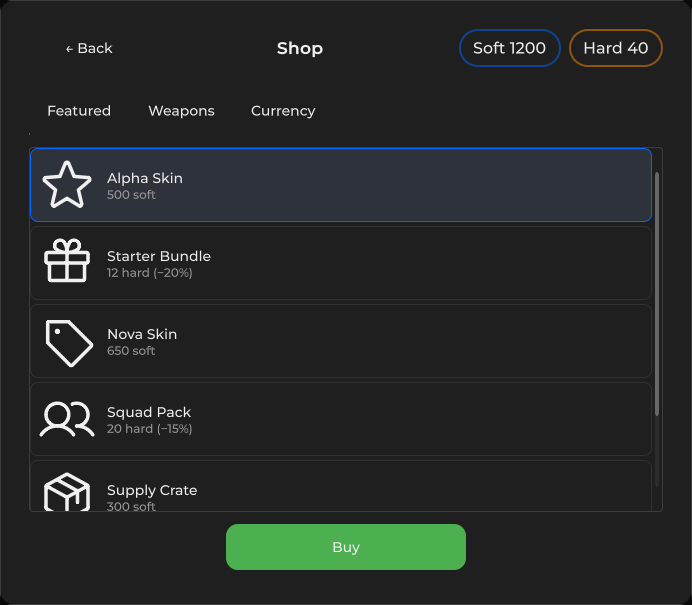
商店面板 — 余额、分类标签页(SetCategories)、物品列表(SetItems)、Buy 由选中项 + CanPurchase 门控。
包
SusGame · 屏幕(商业)
属性
| 名称 | 类型 | 默认值 | |
|---|---|---|---|
Title | Prop<string> | "Shop" | |
SoftBalance | Prop<int> | 0 | |
HardBalance | Prop<int> | 0 | |
CanPurchase | Prop<bool> | true | |
BuyLabel | Prop<string> | "Buy" |
插槽
没有插槽。
事件
| 名称 | 字段 | 载荷 |
|---|---|---|
CategoryChanged | OnCategoryChanged | string |
ItemSelected | OnItemSelected | string |
BuyClicked | OnBuyClicked | — |
样式钩子
USS 类契约 — 无需改 C# 即可覆盖外观。状态通过这些类切换:
breakpoint-mdbreakpoint-smsus-flow-panel--w320sus-flow-panel--w360sus-flow-panel--w380sus-hiddensus-iconsus-scrollsus-shop-screensus-shop-screen__balsus-shop-screen__balancessus-shop-screen__iconsus-shop-screen__itemsus-shop-screen__item--ownedsus-shop-screen__item--selectedsus-shop-screen__itemssus-shop-screen__metasus-shop-screen__namesus-shop-screen__panelsus-shop-screen__pricesus-shop-screen__tabssus-shop-screen__tabs-scrollsus-shop-screen__titlesus-shop-screen__topsus-tabs__tab
用法
xml
<template>
  <sus:SusShopScreenContent
    :Title="Title.Value"
    :SoftBalance="Soft.Value"
    :HardBalance="Hard.Value"
    :CanPurchase="CanBuy.Value"
    :BuyLabel="Buy.Value"
  />
</template>

<script>
public Prop<string> Title = new("Shop");
public Prop<int> Soft = new(1200);
public Prop<int> Hard = new(40);
public Prop<bool> CanBuy = new(true);
public Prop<string> Buy = new("Buy");
</script>
csharp
var shop = new SusShopScreenContent();
shop.Title.Value = "Armory";
shop.SoftBalance.Value = 1200;
shop.HardBalance.Value = 40;
shop.SetCategories(new List<string> { "Weapons", "Cosmetics" }, active: "Weapons");
shop.SetItems(new List<SusShopScreenContent.ShopItem> {
  new() { Id = "rifle", Name = "Rifle", Price = 300, Currency = "soft" },
  new() { Id = "skin", Name = "Camo", Price = 10, Currency = "hard", DiscountPercent = 20 },
  new() { Id = "owned", Name = "Starter kit", Price = 0, Currency = "soft", Owned = true },
});
shop.OnCategoryChanged += cat => { /* reload SetItems */ };
shop.OnItemSelected += id => { /* preview */ };
shop.OnBuyClicked += () => { /* purchase shop.SelectedItemId */ };
shop.BackBtn.OnClick += () => { /* back */ };| Prop / API | Role |
|---|---|
Title | 头部芯片 |
SoftBalance / HardBalance | Soft / Hard 芯片 |
CanPurchase | 选中某个物品时门控 Buy |
BuyLabel | Buy 按钮文本 |
SetCategories(tabs, active?) | 构建 SusTabs items |
SetItems(List<ShopItem>) | 行:Id/Name/Icon/Price/Currency/Owned/DiscountPercent |
SelectedItemId | 最近选中的 id(只读) |
OnCategoryChanged / OnItemSelected / OnBuyClicked | 宿主事件 |
BackBtn / BuyBtn / EmptyAlert | 内置宿主 |
备注
- 空列表显示「No items in this category.」;在选中非已拥有物品之前 Buy 保持禁用。
- 已拥有的行获得
--owned透明度;选中获得--selected。 - 存在于 SusGame pin 中 — 嵌套的
ShopItem是真实的。