
SusHudRoot
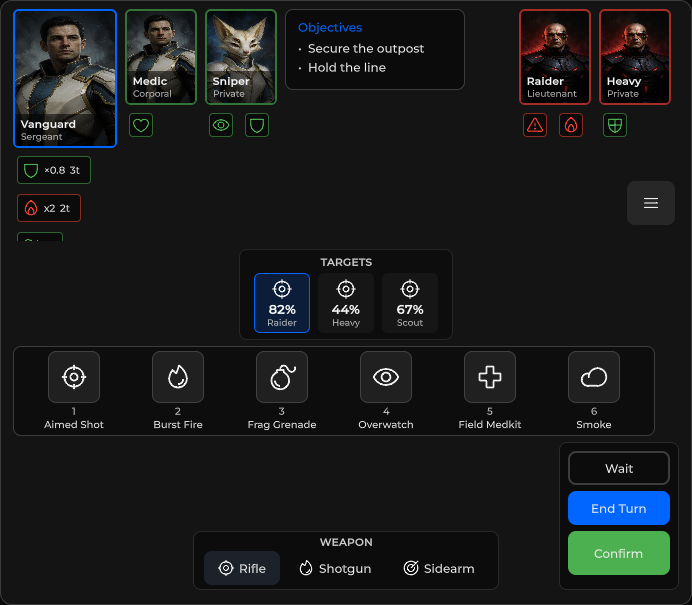
全屏 HUD 外壳——七个绝对定位区域(top / tl / tr / center / bl / br / bottom)用于承载 chrome 模块。
包
SusGame · HUD(商业)
属性
| 名称 | 类型 | 默认值 | |
|---|---|---|---|
Dimmed | Prop<bool> | false | |
BottomLayout | Prop<string> | "stack" |
插槽
| 名称 |
|---|
top |
tl |
tr |
center |
l |
r |
bl |
br |
bottom |
事件
没有公开事件。
样式钩子
USS 类契约 — 无需改 C# 即可覆盖外观。状态通过这些类切换:
sus-hiddensus-hud-rootsus-hud-root__ability-scrollsus-hud-root__bottom-chromesus-hud-root__bottom-chrome-centersus-hud-root__bottom-chrome-leftsus-hud-root__bottom-chrome-rightsus-hud-root__zonesus-hud-root__zone--blsus-hud-root__zone--bottomsus-hud-root__zone--brsus-hud-root__zone--centersus-hud-root__zone--lsus-hud-root__zone--rsus-hud-root__zone--tlsus-hud-root__zone--topsus-hud-root__zone--trsus-hud-root__zone--vacantsus-hud-root--bottom-rowsus-hud-root--dimsus-scrollsus-slot
用法
通过 XML 中的具名插槽组合,或用 MountIn 从代码挂载控件。
csharp
var root = new SusHudRoot();
root.Dimmed.Value = false;
root.MountIn(SusHudZone.TL, new SusHudPlayerStatus());
root.MountIn(SusHudZone.Bottom, new SusAbilityBar());
root.MountIn(SusHudZone.BR, new SusHudTurnActions());
// root.ClearZones(); // wipe all zone children
xml
<template>
  <sus:SusHudRoot :Dimmed="Dim.Value">
    <template #top><!-- objective / banners --></template>
    <template #tl>
      <sus:SusHudPlayerStatus />
    </template>
    <template #tr>
      <sus:SusHudMenuButton />
    </template>
    <template #center><!-- toasts / confirm overlays --></template>
    <template #bl><!-- prompts --></template>
    <template #br>
      <sus:SusHudTurnActions />
    </template>
    <template #bottom>
      <sus:SusAbilityBar />
    </template>
  </sus:SusHudRoot>
</template>

<script>
public Prop<bool> Dim = new(false);
</script>| Prop / API | Role |
|---|---|
Dimmed | 添加 --dim 遮罩(rgba 蒙版) |
插槽 top · tl · tr · center · bl · br · bottom | 区域宿主 |
GetZone(SusHudZone) | 解析区域 VisualElement |
MountIn(zone, element) | 将子元素追加到某区域 |
ClearZones() | 清空所有区域子元素 |
从皮肤重新锚定区域
默认情况下,根节点在代码中让角落区域避开顶部和底部区域:每次布局计算后,它都会写入 TL / TR 的行内 top、Top 的行内 max-height 以及 BL / BR 的行内 bottom。行内样式优先于 USS,因此自行摆放这些区域的皮肤需要关闭此行为。以下任一开关即可:
css
.sus-hud-root { --sus-hud-zones-reanchored: 1; }csharp
hudRoot.ZonesReanchored = true; // before the first layout pass开启后,根节点带有 sus-hud-root--reanchored,上述行内值会被清除且不再写入,由你的皮肤摆放角落区域 并限制顶部区域。L / R 侧栏始终不受影响。
底部区域单行排列
BottomLayout = "row"(默认 "stack")将底部模块排成一行并贴靠右边缘,同时隐藏武器与回合行中 空着的左列(类 sus-hud-root--bottom-row)。预设通过 SusHudPreset.BottomLayout 设置(null 保留根节点的值)。
备注
- 根节点与空区域使用
PickingMode.Ignore,使地图点击可穿透;有交互的子元素保持默认拾取模式。 - 区域是绝对定位的 flex 容器——通过 Assembler /
SusHudModuleKind放置模块,或手动挂载。 SusHudZone:Top、TL、TR、Center、BL、BR、Bottom。