
SusGameSessionScreenContent
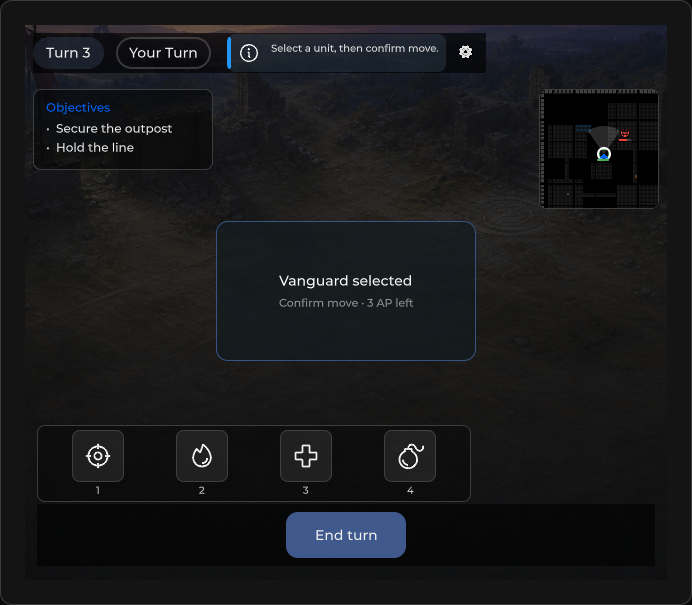
全出血比赛外壳 — 通过 HUD 预设挂载 SusHudRoot、session chrome(turn/phase/hint/quit)、可选的结果遮罩层。
包
SusGame · 屏幕(商业)
属性
| 名称 | 类型 | 默认值 | |
|---|---|---|---|
TurnNumber | Prop<int> | 1 | |
TurnLabel | Prop<string> | "Turn 1" | |
TurnLabelFormat | Prop<string> | "Turn {0}" | |
Phase | Prop<string> | "deployment" | |
PhaseLabel | Prop<string> | "Deployment" | |
IsPlayerTurn | Prop<bool> | true | |
ActiveAction | Prop<string> | "" | |
ShowResult | Prop<bool> | false | |
ResultText | Prop<string> | "" | |
ActionHint | Prop<string> | "" | |
HintVariant | Prop<string> | "info" | |
Locked | Prop<bool> | false | |
Waiting | Prop<bool> | false | |
WaitingText | Prop<string> | "Waiting for opponent…" | |
InputLocked | Prop<bool> | false | |
ResultOutcome | Prop<string> | "victory" | |
ResultDocked | Prop<bool> | false | |
ResultStaged | Prop<bool> | false | |
ResultEntering | Prop<bool> | false | |
ResultView | Prop<string> | "panel" | |
HudPresetId | Prop<string> | SusHudPresetRegistry.Tactical | |
ContinueText | Prop<string> | "Continue" | |
ObjectivesTitle | Prop<string> | "Objectives" | |
DefaultObjectives | Prop<List<string>> | new List<string> { "Deploy units", "Complete the mission" } |
插槽
事件
样式钩子
USS 类契约 — 无需改 C# 即可覆盖外观。状态通过这些类切换:
sc-gs-actionbarsc-gs-result-overlaysc-gs-topbarsus-flow-hintsus-flow-hint--flushsus-flow-panelsus-game-session-action-btnsus-game-session-screensus-game-session-screen__hintsus-game-session-screen__phase-dotsus-game-session-screen__phase-dot--deploysus-game-session-screen__phase-dot--enemysus-game-session-screen__phase-dot--lootsus-game-session-screen__phase-dot--playersus-game-session-screen__phase-dot--waitsus-game-session-screen__phase-labelsus-game-session-screen__quit-btnsus-game-session-screen__resultsus-game-session-screen__result--dockedsus-game-session-screen__result--matchsus-game-session-screen__result-dimsus-game-session-screen__result-glowsus-game-session-screen__result-glow--coresus-game-session-screen__result-panelsus-game-session-screen__turn-labelsus-game-session-screen__waitingsus-game-session-screen__waiting--opensus-game-session-screen__waiting-textsus-game-session-screen__waiting-tracksus-input-locksus-match-result__expandsus-menu-button
用法
绑定 chrome props;修改 HudPresetId 或调用 ApplyHudPreset 来切换模块。从宿主为 QuitBtn / ResultOkBtn 接线。
<template>
  <sus:SusGameSessionScreenContent
    :TurnNumber="Turn.Value"
    :TurnLabel="TurnLbl.Value"
    :Phase="PhaseId.Value"
    :PhaseLabel="PhaseLbl.Value"
    :ActionHint="Hint.Value"
    :ShowResult="ShowEnd.Value"
    :ResultText="Result.Value"
    :HudPresetId="Preset.Value"
  />
</template>

<script>
public Prop<int> Turn = new(1);
public Prop<string> TurnLbl = new("Turn 1");
public Prop<string> PhaseId = new("deployment");
public Prop<string> PhaseLbl = new("Deployment");
public Prop<string> Hint = new("");
public Prop<bool> ShowEnd = new(false);
public Prop<string> Result = new("");
public Prop<string> Preset = new(SusHudPresetRegistry.Deployment);
</script>var session = new SusGameSessionScreenContent();
session.HudPresetId.Value = SusHudPresetRegistry.Tactical;
session.ApplyHudPreset(SusHudPresetRegistry.Tactical);
// After mount — AbilityBar / MinimapFrame / ObjectivePanel from HudMount
session.TurnNumber.Value = 3;
session.PhaseLabel.Value = "Action";
session.ActionHint.Value = "Select a unit";
session.ShowResult.Value = true;
session.ResultText.Value = "Victory";
session.QuitBtn.OnClick += () => { /* confirm quit */ };
session.ResultOkBtn.OnClick += () => { /* dismiss result */ };| Prop / API | 作用 |
|---|---|
TurnNumber / TurnLabel | 回合芯片。在你写入自己的文本之前,TurnLabel 跟随 TurnLabelFormat |
TurnLabelFormat | 回合芯片格式,{0} = TurnNumber。默认 "Turn {0}" |
Phase / PhaseLabel | 阶段芯片文本 |
ActionHint | Chrome 提示 alert;为空 → 隐藏 |
ShowResult / ResultText | 结果遮罩层可见性 + 文案 |
ResultView | "panel"(默认)或 "match"(见下文) |
ContinueText | ResultOkBtn 的文字。默认 "Continue" |
WaitingText | 等待横幅文字。默认 "Waiting for opponent…" |
ObjectivesTitle / DefaultObjectives | 预设目标面板的标题和初始行 |
HudPresetId | 变化时触发 ApplyHudPreset |
IsPlayerTurn / ActiveAction | 已声明的 Prop<> — 当前 pin 未接入 chrome UI |
HudRoot / HudMount | Root + 最近一次 SusHudAssembler.Apply 的结果 |
AbilityBar / MinimapFrame / ObjectivePanel | 来自挂载点的引用(按预设可能为 null) |
MatchResult / ReconnectOverlay / TurnBanner | 内置部件(见各自页面) |
QuitBtn / ResultOkBtn / ActionBar | 宿主接线 |
ApplyHudPreset(id) | 重新应用 assembler + 重建 session chrome |
SetPhaseAliases(map) / CanonicalPhase(phase) | 把你自己的阶段名映射到带样式的阶段键 |
ShowReconnect(deadlineSeconds, text) / ShowReconnectFailed(onRetry, onLeave, text) | 带截止时间 / 带重试和离开的重连遮罩层 |
结果视图
ResultView = "panel"(默认)保留简单的结果面板:一行文字和 ResultOkBtn。 ResultView = "match" 改为显示对局结果卡片, 并把同一个 ResultOkBtn 实例(名称、类和点击处理器保持不变)移到卡片操作行的最前面; 切回 "panel" 会把它移回原处。其他任何值都视为 "panel"。
session.ResultView.Value = "match";
session.MatchResult.Title.Value = "Victory";
session.MatchResult.DockText.Value = "Collect loot"; // secondary action: fold the card into the side panel
session.ShowResult.Value = true;
按下 DockText 按钮会设置 ResultDocked = true。在 match 视图中,遮罩层根元素获得 sus-game-session-screen__result--match。
当该内容运行在 SusGameSessionScreen 内时,其 ShowVictory(details)、 ShowDefeat(details) 和 ShowDraw(details) 会在 match 视图中填充卡片:MatchResult.Title 获得 面板默认显示的已翻译结果文字(“Victory!”、“Defeat”、“Draw”;随语言区域变化), MatchResult.Reason 原样获得 details(为空则隐藏该行),ResultOutcome 变为 victory、defeat 或 draw。你自行写入的 Title 或 Reason 永远不会被 覆盖,因此在上面的示例中你的 "Victory" 会保留。kicker、SetSummary、SetGrowth 和 SetRank 仍由你掌控。在 panel 视图中显示的结果,会在你把 ResultView 切换为 "match" 时带到卡片上。
阶段别名
阶段芯片由一小组阶段键设置样式:player、enemy、wait、deploy、loot。 如果你的游戏使用自己的阶段名,只需映射一次,而不必重命名:
session.SetPhaseAliases(new Dictionary<string, string>
{
    ["combat"] = "player",
    ["turn-pending"] = "wait",
});
阶段先在映射表中查找,再与这些键匹配;两处都没有的阶段保持中性外观。 新的映射表会替换旧的,null 或空表会清除映射,当前 Phase 会立即重新设置样式。 没有内置同义词。路由屏幕 SusGameSessionScreen 也有同样的 SetPhaseAliases。
重连
ShowReconnect(deadlineSeconds) 显示带倒计时的重连状态, ShowReconnectFailed(onRetry, onLeave) 显示带两个操作的失败状态。两者都转发给 内置的重连遮罩层,OnDeadline、 TimerFormat 和按钮文字都在那里。
本地化字符串
本屏幕的默认文字(回合格式、阶段、等待横幅、继续按钮、目标) 以及路由屏幕 SusGameSessionScreen 的默认文字(退出按钮、结果文字、阶段名)都经由 SusGame String Table 解析。你自行设置的值始终优先。 参见本地化字符串。
在路由屏幕上,只有当路由设置了 resultLabel 路由 prop 时才会应用它; 否则按钮文字来自 ContinueText 及其翻译。
备注
- 默认预设 =
SusHudPresetRegistry.Deployment。空 id 回退到Tactical。 ApplyHudPreset会用DefaultObjectives(Deploy units/Complete the mission)填充目标面板,直到宿主调用ObjectivePanel.SetObjectives为止 — 正式任务请替换它们。- Session chrome 期望预设提供
session-chrome自定义宿主;否则挂载到TL。
替换自定义变通做法
如果你的项目过去手工重建了该屏幕的某些部分,请改用内置 API:
| 自定义变通做法 | 内置 API |
|---|---|
| 在遮罩层显示后写入结果按钮文字 | ContinueText(resultLabel 路由 prop 仅在设置时生效) |
| 自行翻译“Turn N”、回合按钮、横幅和重连文字 | TurnLabelFormat 以及各 HUD 部件的文字 props,全部位于 SusGame 表中 |
| 隐藏旧的结果面板、移动其按钮、填充展开按钮图标 | ResultView = "match"、MatchResult.DockText、默认 ExpandIcon |
| 自建重连计时器和进度 | ShowReconnect(deadlineSeconds)、ShowReconnectFailed(onRetry, onLeave)、遮罩层的 TimerFormat / OnDeadline |
| 把阶段名映射到自己的样式键 | SetPhaseAliases(map) |