
AuthModalContent
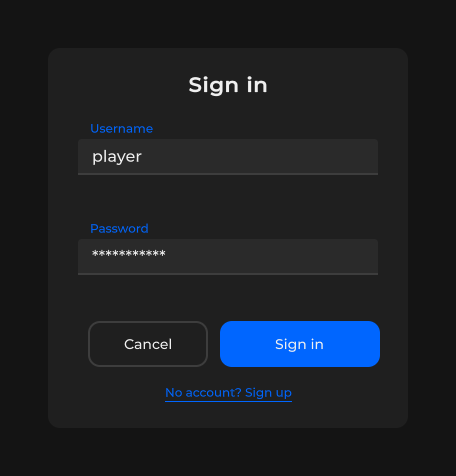
登录 / 注册面板 — username + password 字段、错误提示、submit/cancel、可选的切换链接;通过 SetBusy 显示忙碌遮罩。
包
SusGame · 屏幕(商业)
属性
| 名称 | 类型 | 默认值 | |
|---|---|---|---|
TitleText | Prop<string> | "" | |
SubmitLabel | Prop<string> | "Sign in" | |
ErrorText | Prop<string> | "" | |
SwitchLabel | Prop<string> | "" | |
Kicker | Prop<string> | "" |
插槽
没有插槽。
事件
没有公开事件。
样式钩子
USS 类契约 — 无需改 C# 即可覆盖外观。状态通过这些类切换:
auth-modal-contentauth-modal-content__panelsus-auth-modal__error-kickersus-auth-modal__fieldssus-auth-modal__kickersus-flow-actions-rowsus-flow-btn--mr12sus-flow-link--footer
用法
挂载后为公开按钮 / 链接的宿主点击事件接线。用 Prop<> 绑定标签和错误文本。
xml
<template>
  <sus:AuthModalContent
    :TitleText="Title.Value"
    :SubmitLabel="Submit.Value"
    :ErrorText="Error.Value"
    :SwitchLabel="Switch.Value"
  />
</template>

<script>
public Prop<string> Title = new("Sign in");
public Prop<string> Submit = new("Sign in");
public Prop<string> Error = new("");
public Prop<string> Switch = new("Create account");
</script>
csharp
var auth = new AuthModalContent();
auth.TitleText.Value = "Sign in";
auth.SubmitLabel.Value = "Sign in";
auth.SwitchLabel.Value = "Create account";
auth.ErrorText.Value = ""; // non-empty shows SusAlert
// After mount:
auth.SubmitBtn.OnClick += () => { /* login */ };
auth.CancelBtn.OnClick += () => { /* dismiss */ };
auth.SwitchLink.OnClick += () => { /* flip mode */ };
auth.SetBusy(true, "Signing in…"); // overlay + disables fields
auth.SetBusy(false);| Prop / API | Role |
|---|---|
TitleText | 标题(SusBanner) |
SubmitLabel | 主按钮文本 |
ErrorText | 错误提示文本;为空 → 隐藏 |
SwitchLabel | 页脚链接文本 |
UsernameField / PasswordField | 内置的 SusTextfield 宿主 |
SubmitBtn / CancelBtn / SwitchLink | 宿主接线动作 |
SetBusy(busy, message?) | SusServerBusyOverlay + 禁用控件 |
备注
- 在
Created/EnsureBuilt中延迟构建 — 之前字段为 null。 - 密码字段创建时带
password: true。 - 优先使用拥有导航逻辑的宿主 screen/modal;本组件仅是内容(不含路由逻辑)。