
SusProfileScreenContent
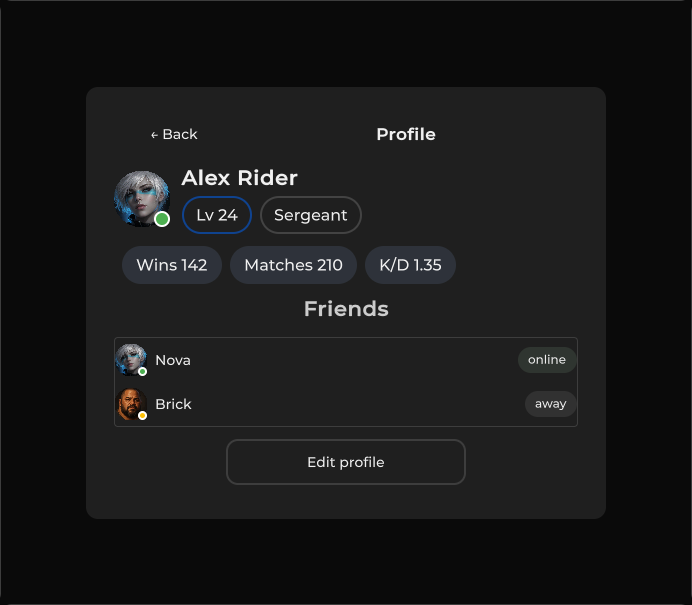
玩家资料面板 — 头像、name/rank 芯片、wins/matches/K-D、通过 SetFriends 提供的好友列表、编辑门控。
包
SusGame · 屏幕(商业)
属性
| 名称 | 类型 | 默认值 | |
|---|---|---|---|
DisplayName | Prop<string> | "Player" | |
AvatarImage | Prop<string> | "" | |
AvatarStatus | Prop<string> | "" | |
Level | Prop<int> | 1 | |
Xp | Prop<int> | 0 | |
Rank | Prop<string> | "Recruit" | |
Wins | Prop<int> | 0 | |
Matches | Prop<int> | 0 | |
Kd | Prop<float> | 0f | |
CanEdit | Prop<bool> | true |
插槽
没有插槽。
事件
| 名称 | 字段 | 载荷 |
|---|---|---|
FriendClicked | OnFriendClicked | string |
样式钩子
USS 类契约 — 无需改 C# 即可覆盖外观。状态通过这些类切换:
sus-chip__textsus-hiddensus-profile-screensus-profile-screen__friendsus-profile-screen__friend-avsus-profile-screen__friend-namesus-profile-screen__friend-statussus-profile-screen__friendssus-profile-screen__id-colsus-profile-screen__identitysus-profile-screen__namesus-profile-screen__ranksus-profile-screen__rank-rowsus-profile-screen__statsus-profile-screen__statssus-profile-screen__top
用法
绑定身份/统计 props;通过 SetFriends 推送好友数据。为 BackBtn / EditBtn / OnFriendClicked 接线。
xml
<template>
  <sus:SusProfileScreenContent
    :DisplayName="Name.Value"
    :AvatarImage="AvatarImg.Value"
    :AvatarStatus="Status.Value"
    :Level="Lvl.Value"
    :Rank="Rank.Value"
    :Wins="Wins.Value"
    :Matches="Matches.Value"
    :Kd="Kd.Value"
    :CanEdit="Edit.Value"
  />
</template>

<script>
public Prop<string> Name = new("Player");
public Prop<string> AvatarImg = new("");
public Prop<string> Status = new("online");
public Prop<int> Lvl = new(1);
public Prop<string> Rank = new("Recruit");
public Prop<int> Wins = new(0);
public Prop<int> Matches = new(0);
public Prop<float> Kd = new(0f);
public Prop<bool> Edit = new(true);
</script>
csharp
var profile = new SusProfileScreenContent();
profile.DisplayName.Value = "Nova";
profile.Level.Value = 12;
profile.Rank.Value = "Veteran";
profile.Wins.Value = 40;
profile.Matches.Value = 55;
profile.Kd.Value = 1.25f;
profile.CanEdit.Value = true;
profile.SetFriends(new List<SusProfileScreenContent.FriendRow> {
  new() { Id = "u1", Name = "Ally", Status = "online" },
  new() { Id = "u2", Name = "Rival", Status = "offline" },
});
profile.OnFriendClicked += id => { /* open friend */ };
profile.BackBtn.OnClick += () => { /* back */ };
profile.EditBtn.OnClick += () => { /* edit flow */ };| Prop / API | Role |
|---|---|
DisplayName | 名称芯片 + 头像文本 |
AvatarImage / AvatarStatus | 头像图片 URL / 状态 |
Level / Rank | Rank 行芯片 |
Wins / Matches / Kd | 统计芯片 |
Xp | 已声明的 Prop<int> — 当前 pin 未在 UI 中显示 |
CanEdit | 为 false 时禁用 EditBtn |
SetFriends(List<FriendRow>) | 重建好友行(Id/Name/Status/AvatarIcon) |
OnFriendClicked | Action<string>(id 或 name) |
BackBtn / EditBtn / FriendsHost | 宿主接线 |
备注
- 好友列表为空时通过
EmptyFriends显示「No friends yet.」。 FriendRow.Status会转为小写用作头像状态;online还会为状态标签着色。- 存在于 SusGame pin 中 — 类型是真实的(
SusProfileScreenContent/ 嵌套的FriendRow)。