
SusHudRoot
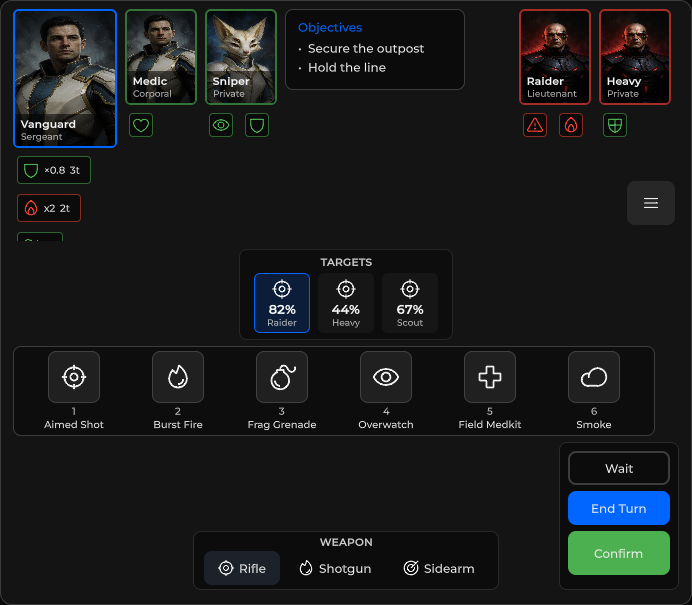
Full-bleed HUD shell — seven absolute zones (top / tl / tr / center / bl / br / bottom) for chrome modules.
Package
SusGame · HUD (commercial)
Props
| Name | Type | Default | |
|---|---|---|---|
Dimmed | Prop<bool> | false | |
BottomLayout | Prop<string> | "stack" |
Slots
| Name |
|---|
top |
tl |
tr |
center |
l |
r |
bl |
br |
bottom |
Events
Style hooks
USS class contract — override appearance without touching C#. States toggle via these classes:
sus-hiddensus-hud-rootsus-hud-root__ability-scrollsus-hud-root__bottom-chromesus-hud-root__bottom-chrome-centersus-hud-root__bottom-chrome-leftsus-hud-root__bottom-chrome-rightsus-hud-root__zonesus-hud-root__zone--blsus-hud-root__zone--bottomsus-hud-root__zone--brsus-hud-root__zone--centersus-hud-root__zone--lsus-hud-root__zone--rsus-hud-root__zone--tlsus-hud-root__zone--topsus-hud-root__zone--trsus-hud-root__zone--vacantsus-hud-root--bottom-rowsus-hud-root--dimsus-scrollsus-slot
Usage
Compose with named slots in XML, or mount widgets from code with MountIn.
var root = new SusHudRoot();
root.Dimmed.Value = false;
root.MountIn(SusHudZone.TL, new SusHudPlayerStatus());
root.MountIn(SusHudZone.Bottom, new SusAbilityBar());
root.MountIn(SusHudZone.BR, new SusHudTurnActions());
// root.ClearZones(); // wipe all zone children<template>
<sus:SusHudRoot :Dimmed="Dim.Value">
<template #top><!-- objective / banners --></template>
<template #tl>
<sus:SusHudPlayerStatus />
</template>
<template #tr>
<sus:SusHudMenuButton />
</template>
<template #center><!-- toasts / confirm overlays --></template>
<template #bl><!-- prompts --></template>
<template #br>
<sus:SusHudTurnActions />
</template>
<template #bottom>
<sus:SusAbilityBar />
</template>
</sus:SusHudRoot>
</template>
<script>
public Prop<bool> Dim = new(false);
</script>| Prop / API | Role |
|---|---|
Dimmed | Adds --dim overlay (rgba veil) |
Slots top · tl · tr · center · bl · br · bottom | Zone hosts |
GetZone(SusHudZone) | Resolve zone VisualElement |
MountIn(zone, element) | Append child into a zone |
ClearZones() | Clear all zone children |
Re-anchoring the zones from a skin
By default the root keeps the corner zones clear of the top and bottom zones in code: after each layout pass it writes the inline top of TL / TR, the inline max-height of Top and the inline bottom of BL / BR. Inline styles beat USS, so a skin that places these zones itself needs to switch this off. Either switch is enough:
.sus-hud-root { --sus-hud-zones-reanchored: 1; }hudRoot.ZonesReanchored = true; // before the first layout passWhile on, the root carries sus-hud-root--reanchored, those inline values are cleared and not written again, and your skin places the corner zones and limits the top zone. L / R side rails are never touched.
Bottom zone in one row
BottomLayout = "row" (default "stack") puts the bottom modules in one row pinned to the right edge and hides the empty left column of the weapon and turn row (class sus-hud-root--bottom-row). A preset sets it with SusHudPreset.BottomLayout (null leaves the root's value).
Notes
- Root and empty zones use
PickingMode.Ignoreso map clicks pass through; interactive children keep default picking. - Zones are absolute flex shells — place modules via Assembler /
SusHudModuleKind, or mount manually. SusHudZone:Top,TL,TR,Center,BL,BR,Bottom.