
SusGameSessionScreenContent
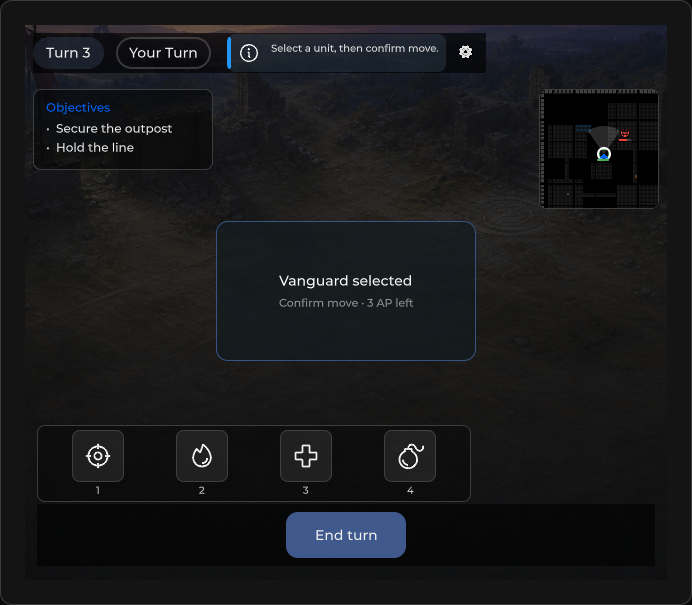
Full-bleed match shell — mounts SusHudRoot via HUD preset, session chrome (turn/phase/hint/quit), optional result overlay.
Package
SusGame · Screens (commercial)
Props
| Name | Type | Default | |
|---|---|---|---|
TurnNumber | Prop<int> | 1 | |
TurnLabel | Prop<string> | "Turn 1" | |
TurnLabelFormat | Prop<string> | "Turn {0}" | |
Phase | Prop<string> | "deployment" | |
PhaseLabel | Prop<string> | "Deployment" | |
IsPlayerTurn | Prop<bool> | true | |
ActiveAction | Prop<string> | "" | |
ShowResult | Prop<bool> | false | |
ResultText | Prop<string> | "" | |
ActionHint | Prop<string> | "" | |
HintVariant | Prop<string> | "info" | |
Locked | Prop<bool> | false | |
Waiting | Prop<bool> | false | |
WaitingText | Prop<string> | "Waiting for opponent…" | |
InputLocked | Prop<bool> | false | |
ResultOutcome | Prop<string> | "victory" | |
ResultDocked | Prop<bool> | false | |
ResultStaged | Prop<bool> | false | |
ResultEntering | Prop<bool> | false | |
ResultView | Prop<string> | "panel" | |
HudPresetId | Prop<string> | SusHudPresetRegistry.Tactical | |
ContinueText | Prop<string> | "Continue" | |
ObjectivesTitle | Prop<string> | "Objectives" | |
DefaultObjectives | Prop<List<string>> | new List<string> { "Deploy units", "Complete the mission" } |
Slots
Events
Style hooks
USS class contract — override appearance without touching C#. States toggle via these classes:
sc-gs-actionbarsc-gs-result-overlaysc-gs-topbarsus-flow-hintsus-flow-hint--flushsus-flow-panelsus-game-session-action-btnsus-game-session-screensus-game-session-screen__hintsus-game-session-screen__phase-dotsus-game-session-screen__phase-dot--deploysus-game-session-screen__phase-dot--enemysus-game-session-screen__phase-dot--lootsus-game-session-screen__phase-dot--playersus-game-session-screen__phase-dot--waitsus-game-session-screen__phase-labelsus-game-session-screen__quit-btnsus-game-session-screen__resultsus-game-session-screen__result--dockedsus-game-session-screen__result--matchsus-game-session-screen__result-dimsus-game-session-screen__result-glowsus-game-session-screen__result-glow--coresus-game-session-screen__result-panelsus-game-session-screen__turn-labelsus-game-session-screen__waitingsus-game-session-screen__waiting--opensus-game-session-screen__waiting-textsus-game-session-screen__waiting-tracksus-input-locksus-match-result__expandsus-menu-button
Usage
Bind chrome props; change HudPresetId or call ApplyHudPreset to swap modules. Wire QuitBtn / ResultOkBtn from host.
<template>
  <sus:SusGameSessionScreenContent
    :TurnNumber="Turn.Value"
    :TurnLabel="TurnLbl.Value"
    :Phase="PhaseId.Value"
    :PhaseLabel="PhaseLbl.Value"
    :ActionHint="Hint.Value"
    :ShowResult="ShowEnd.Value"
    :ResultText="Result.Value"
    :HudPresetId="Preset.Value"
  />
</template>

<script>
public Prop<int> Turn = new(1);
public Prop<string> TurnLbl = new("Turn 1");
public Prop<string> PhaseId = new("deployment");
public Prop<string> PhaseLbl = new("Deployment");
public Prop<string> Hint = new("");
public Prop<bool> ShowEnd = new(false);
public Prop<string> Result = new("");
public Prop<string> Preset = new(SusHudPresetRegistry.Deployment);
</script>var session = new SusGameSessionScreenContent();
session.HudPresetId.Value = SusHudPresetRegistry.Tactical;
session.ApplyHudPreset(SusHudPresetRegistry.Tactical);
// After mount — AbilityBar / MinimapFrame / ObjectivePanel from HudMount
session.TurnNumber.Value = 3;
session.PhaseLabel.Value = "Action";
session.ActionHint.Value = "Select a unit";
session.ShowResult.Value = true;
session.ResultText.Value = "Victory";
session.QuitBtn.OnClick += () => { /* confirm quit */ };
session.ResultOkBtn.OnClick += () => { /* dismiss result */ };| Prop / API | Role |
|---|---|
TurnNumber / TurnLabel | Turn chip. TurnLabel follows TurnLabelFormat until you write your own label |
TurnLabelFormat | Turn chip format, {0} = TurnNumber. Default "Turn {0}" |
Phase / PhaseLabel | Phase chip label |
ActionHint | Chrome hint alert; empty → hidden |
ShowResult / ResultText | Result overlay visibility + copy |
ResultView | "panel" (default) or "match" (see below) |
ContinueText | Label of ResultOkBtn. Default "Continue" |
WaitingText | Waiting banner text. Default "Waiting for opponent…" |
ObjectivesTitle / DefaultObjectives | Caption and starting rows of the preset's objective panel |
HudPresetId | Triggers ApplyHudPreset on change |
IsPlayerTurn / ActiveAction | Declared Prop<> — not wired to chrome UI in current pin |
HudRoot / HudMount | Root + last SusHudAssembler.Apply result |
AbilityBar / MinimapFrame / ObjectivePanel | Refs from mount (may be null by preset) |
MatchResult / ReconnectOverlay / TurnBanner | Built-in parts (see their pages) |
QuitBtn / ResultOkBtn / ActionBar | Host wiring |
ApplyHudPreset(id) | Re-apply assembler + rebuild session chrome |
SetPhaseAliases(map) / CanonicalPhase(phase) | Map your own phase names onto the styled phase keys |
ShowReconnect(deadlineSeconds, text) / ShowReconnectFailed(onRetry, onLeave, text) | Reconnect overlay with a deadline / with retry and leave |
Result view
ResultView = "panel" (default) keeps the plain result panel: a label and ResultOkBtn. ResultView = "match" shows the match result card instead and moves the same ResultOkBtn instance (name, classes and click handler intact) to the front of the card's action row; switching back to "panel" moves it home. Any other value counts as "panel".
session.ResultView.Value = "match";
session.MatchResult.Title.Value = "Victory";
session.MatchResult.DockText.Value = "Collect loot"; // secondary action: fold the card into the side panel
session.ShowResult.Value = true;
Pressing the DockText button sets ResultDocked = true. The overlay root gets sus-game-session-screen__result--match in match view.
When the content runs inside SusGameSessionScreen, its ShowVictory(details), ShowDefeat(details) and ShowDraw(details) fill the card in match view: MatchResult.Title gets the translated outcome line the panel shows by default ("Victory!", "Defeat", "Draw"; it follows the locale), MatchResult.Reason gets details as is (empty hides the line), and ResultOutcome becomes victory, defeat or draw. A Title or Reason you wrote yourself is never overwritten, so in the example above your "Victory" stays. The kicker, SetSummary, SetGrowth and SetRank stay yours. A result shown in panel view carries over to the card when you switch ResultView to "match".
Phase aliases
The phase chip is styled by a small set of phase keys: player, enemy, wait, deploy, loot. If your game uses its own phase names, map them once instead of renaming them:
session.SetPhaseAliases(new Dictionary<string, string>
{
    ["combat"] = "player",
    ["turn-pending"] = "wait",
});
The phase is looked up in the map first, then matched against the keys; a phase that is in neither keeps the neutral look. A new map replaces the previous one, null or empty clears it, and the current Phase is restyled at once. No synonyms are built in. The router screen SusGameSessionScreen has the same SetPhaseAliases.
Reconnect
ShowReconnect(deadlineSeconds) shows the reconnecting state with a countdown, and ShowReconnectFailed(onRetry, onLeave) shows the failed state with two actions. Both forward to the built-in reconnect overlay, where OnDeadline, TimerFormat and the button texts live.
Localized strings
The default texts of this screen (turn format, phase, waiting banner, continue button, objectives) and of the router screen SusGameSessionScreen (quit button, result lines, phase names) go through the SusGame String Table. A value you set yourself always wins. See Localized strings.
On the router screen, the resultLabel route prop is applied only when the route sets it; otherwise the button text comes from ContinueText and its translation.
Notes
- Default preset =
SusHudPresetRegistry.Deployment. Empty id falls back toTactical. ApplyHudPresetseeds the objective panel withDefaultObjectives(Deploy units/Complete the mission) until the host callsObjectivePanel.SetObjectives— replace them for real missions.- Session chrome expects a
session-chromecustom host from the preset; otherwise mounts intoTL.
Replacing custom workarounds
If your project rebuilt parts of this screen by hand, switch to the built-in API:
| Custom workaround | Built-in API |
|---|---|
| Write the result button text after the overlay shows | ContinueText (the resultLabel route prop only when set) |
| Translate "Turn N", turn buttons, banner and reconnect texts yourself | TurnLabelFormat and the text props of the HUD parts, all in the SusGame table |
| Hide the old result panel, move its button, fill the expand button icon | ResultView = "match", MatchResult.DockText, default ExpandIcon |
| Your own reconnect timer and progress | ShowReconnect(deadlineSeconds), ShowReconnectFailed(onRetry, onLeave), overlay TimerFormat / OnDeadline |
| Map your phase names to your own style keys | SetPhaseAliases(map) |