
SusToggle
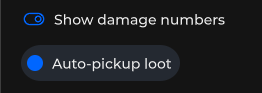
带标签的布尔开关 —— 用于设置和筛选的开/关。
包
SusKit · 原子(商业)
属性
| 名称 | 类型 | 默认值 | |
|---|---|---|---|
Model | Prop<bool> | false | v-model |
Label | Prop<string> | "" | v-model |
Color | Prop<string> | "primary" | v-model |
LabelPosition | Prop<string> | "right" | v-model |
Inset | Prop<bool> | false | v-model |
Disabled | Prop<bool> | false | v-model |
Loading | Prop<bool> | false | v-model |
Density | Prop<string> | "default" | v-model |
Variant | Prop<string> | "icon" | v-model |
插槽
没有插槽。
事件
| 名称 | 字段 | 载荷 |
|---|---|---|
Change | OnChange | bool |
样式钩子
USS 类契约 — 无需改 C# 即可覆盖外观。状态通过这些类切换:
keyboard-focussus-hiddensus-togglesus-toggle__iconsus-toggle__labelsus-toggle__label--leftsus-toggle__label--rightsus-toggle__track-thumbsus-toggle--activesus-toggle--dangersus-toggle--disabledsus-toggle--insetsus-toggle--label-leftsus-toggle--label-rightsus-toggle--loadingsus-toggle--primarysus-toggle--successsus-toggle--track
用法
xml
<template>
  <sus:SusToggle Label="Show HUD"
                 :Model="HudVisible.Value"
                 Color="primary"
                 LabelPosition="right"
                 @change="OnHud" />
</template>

<script>
public Prop<bool> HudVisible = new(true);
void OnHud(bool value) { /* … */ }
</script>
csharp
var toggle = new SusToggle();
toggle.Label.Value = "Mute chat";
toggle.Model.Value = false;
toggle.Color.Value = "success";
toggle.Inset.Value = true;
toggle.OnChange += value => { /* … */ };
颜色
primary · success · danger(允许时还可使用主题 token)
备注
LabelPosition:left·right。- 在设置同步期间,
Loading会让控件保持忙碌状态。