
SusDataTable
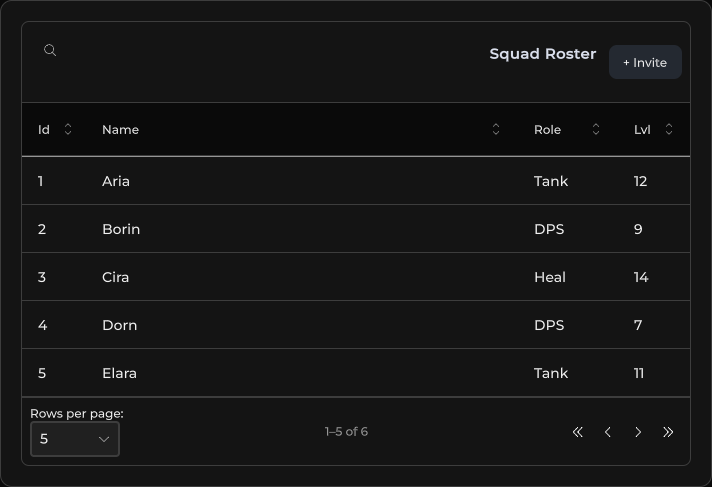
带工具栏、类型化单元格、排序 / 搜索 / 分页的数据表格 — 由 SusTableController 驱动。
包
SusKit · 数据(商业)
属性
| 名称 | 类型 | 默认值 | |
|---|---|---|---|
Controller | Prop<SusTableController> | new SusTableController() | v-model |
ShowToolbar | Prop<bool> | true | v-model |
Density | Prop<string> | "default" | v-model |
Variant | Prop<string> | "elevated" | v-model |
Hover | Prop<bool> | true | v-model |
SearchPlaceholder | Prop<string> | "Search..." | v-model |
EmptyText | Prop<string> | "No data available" | v-model |
RowsPerPageLabel | Prop<string> | "Rows per page:" | v-model |
RowsPerPageAutoLabel | Prop<string> | "Rows per page: auto" | v-model |
AllRowsLabel | Prop<string> | "All" | v-model |
插槽
| 名称 |
|---|
toolbar |
事件
没有公开事件。
样式钩子
USS 类契约 — 无需改 C# 即可覆盖外观。状态通过这些类切换:
keyboard-focussus-data-tablesus-data-table__action-btnsus-data-table__cellsus-data-table__cell--actionssus-data-table__cell--align-centersus-data-table__cell--align-endsus-data-table__cell--descriptionsus-data-table__cell--fixed-widthsus-data-table__cell--selectsus-data-table__cell--togglesus-data-table__cell-wrapsus-data-table__emptysus-data-table__empty-framesus-data-table__empty-textsus-data-table__footersus-data-table__footer-btnsus-data-table__footer-infosus-data-table__footer-leftsus-data-table__footer-rightsus-data-table__footer-selectsus-data-table__header-cellsus-data-table__header-cell--sort-wiredsus-data-table__header-cell--sortablesus-data-table__header-titlesus-data-table__header-title--align-centersus-data-table__header-title--align-endsus-data-table__header-title--sortablesus-data-table__hostsus-data-table__host--fixed-heightsus-data-table__loading-barsus-data-table__loading-overlaysus-data-table__radiosus-data-table__radio--disabledsus-data-table__radio--onsus-data-table__radio-dotsus-data-table__row-markersus-data-table__row-marker--onsus-data-table__row-marker--pulsesus-data-table__searchsus-data-table__skeletonsus-data-table__skeleton-barsus-data-table__skeleton-bar--altsus-data-table__skeleton-rowsus-data-table__sort-btnsus-data-table__sort-btn--activesus-data-table__toolbarsus-data-table__toolbar-actionssus-data-table__viewsus-data-table--density-comfortablesus-data-table--density-compactsus-data-table--hoversus-data-table--variant-flatsus-data-table--variant-outlinedsus-healthbarsus-hiddensus-selectsus-select__detailssus-select__fieldsus-select__valuesus-slotsus-table__action-btnsus-table__cell--boxedsus-table__cell--customsus-table__cell--mediasus-table__cell--numbersus-table__cell--progresssus-table__cell--segmentssus-table__cell--togglesus-table__cell--two-linesus-table__cell-subsus-table__cell-titlesus-table__segmentsus-table__segment--onsus-table__segmentssus-table__segments--fullsus-table__segments-countsus-textfieldunity-collection-view__itemunity-collection-view__item--selectedunity-list-view__itemunity-list-view__item--alternatedunity-list-view__item--selectedunity-multi-column-headerunity-multi-column-header__columnunity-multi-column-header__column__sort-indicatorunity-multi-column-header__column-sortingunity-multi-column-header__column-sorting-indicatorunity-multi-column-view__header-container
用法
列和行定义在控制器上(SetColumns / SetItems)。可选的 ApplyKindDefaults 应用一个 SusTableKind 预设。
csharp
var ctrl = new SusTableController();
ctrl.ApplyKindDefaults(SusTableKind.MainList);
ctrl.SetColumns(new List<ColumnDef>
{
    new() { Key = "Name", Title = "Name", MinWidth = 140f, Sortable = true, Searchable = true },
    new() { Key = "Role", Title = "Role", Width = 100f, Sortable = true },
    new() { Key = "Level", Title = "Lvl", Width = 72f, Align = "end",
            CellType = SusCellType.Number, Sortable = true },
});
ctrl.SetItems(new List<object>
{
    new Dictionary<string, object> { ["Name"] = "Aria", ["Role"] = "Tank", ["Level"] = 12 },
    new Dictionary<string, object> { ["Name"] = "Borin", ["Role"] = "DPS", ["Level"] = 9 },
});
ctrl.SetItemsPerPage(5);

var table = new SusDataTable();
table.Controller.Value = ctrl;
table.ShowToolbar.Value = true;
table.Density.Value = "default";
table.Variant.Value = "elevated";
table.Hover.Value = true;
xml
<template>
  <sus:SusDataTable :Controller="TableCtrl.Value"
                    :ShowToolbar="ShowToolbar.Value"
                    :Density="Density.Value"
                    :Variant="Variant.Value"
                    :Hover="Hover.Value">
    <template #toolbar>
      <!-- Optional actions next to global search -->
    </template>
  </sus:SusDataTable>
</template>

<script>
public Prop<SusTableController> TableCtrl = new(new());
public Prop<bool> ShowToolbar = new(true);
public Prop<string> Density = new("default");
public Prop<string> Variant = new("elevated");
public Prop<bool> Hover = new(true);
// Populate TableCtrl columns/items in code (see above).
</script>| Prop | 作用 |
|---|---|
Controller | SusTableController — 列、条目、排序、搜索、分页 |
ShowToolbar | 全局搜索 + toolbar 插槽 |
Density | default · compact · comfortable |
Variant | elevated · flat · outlined |
Hover | 行悬停高亮 |
双行单元格
SusHeaders.TwoLine(key, subKey, title) 在一个单元格中放入两个值:key 的值作为标题,subKey 的值作为标题下方较淡的第二行(SusCellType.TwoLine)。适用于名称旁需要附带服务器、地区或副标题的情况。
csharp
ctrl.SetColumns(new List<ColumnDef>
{
    SusHeaders.TwoLine("Name", "World", "Player"),
    SusHeaders.Number("Rating"),
});
ctrl.SetItems(new List<object>
{
    new Dictionary<string, object> { ["Name"] = "Aria", ["World"] = "North Reach", ["Rating"] = 1840 },
    new Dictionary<string, object> { ["Name"] = "Borin", ["World"] = "", ["Rating"] = 1712 },
});- 每一行都是独立的标签,各自以省略号截断;两行都不换行,因此单元格永远不会超出行高。
- 两行都关闭了富文本,因此数据中的标记会以纯文本显示。
- 排序和全局搜索只使用
key的值。 - 第二行为空时会获得
sus-hidden,标题单独占据该单元格。 - 样式钩子:
sus-table__cell--two-line(单元格)、sus-table__cell-title、sus-table__cell-sub。
表格 token
三个 token 决定表格外壳的尺寸。在你的皮肤或主题 USS 中设置它们:
| Token | 默认值 | 控制内容 |
|---|---|---|
--sk-table-header-underlay | transparent | 表头行后面的背景。Unity 的 MultiColumnListView 会用 Unity 主题绘制该区域;kit 只在 .sus-data-table 内部覆盖它,因此你自己的 MultiColumnListView 会保留主题。 |
--sk-table-cell-pad-x | --sk-space-8 | 每个单元格的左右内边距。默认遵循 density 阶梯。 |
--sk-table-cell-number-pad-x | --sk-table-cell-pad-x | 仅数字单元格的左右内边距。它叠加在单元格包裹的内边距(--sk-table-cell-pad-x,默认每侧 8 px)之上,而不是替代它,因此要让短数字放进窄列,请同时设置两个 token。 |
css
.my-skin .sus-data-table {
    --sk-table-header-underlay: rgba(0, 0, 0, 0.35);
    --sk-table-cell-number-pad-x: 2px;
}
数字单元格
默认情况下,数字单元格保持其自然宽度。它不会收缩,也从不显示省略号:比列更宽的数字会延伸进单元格内边距,而不是被截断。如果你的皮肤更想要省略号,请在同一个选择器上添加:
css
.my-skin .sus-data-table__cell.sus-table__cell--number {
    flex-shrink: 1;
    min-width: 0;
    overflow: hidden;
    white-space: nowrap;
    text-overflow: ellipsis;
}
常见覆盖的皮肤钩子
如果你的皮肤过去是手工修补表格,请改用内置钩子:
| 自定义变通做法 | 内置钩子 |
|---|---|
| 带有较小第二行并重新开启换行的富文本标签 | SusHeaders.TwoLine → sus-table__cell-title / sus-table__cell-sub |
| 重新绘制表头后面的灰色条 | --sk-table-header-underlay |
| 窄列中数字被截成“2…” | --sk-table-cell-number-pad-x(如需省略号,参见 数字单元格) |
说明
- 需要工具栏、kind 预设或类型化单元格(
SusCellType:text · number · icon · image · toggle · badge · progress · description · two-line · actions)时,优先用SusDataTable而不是SusTable。 SusTableKind:MainList·Picker·ActionList·ReadOnly·Dev— 通过ApplyKindDefaults应用。- 行操作 / 选择 / 加载状态定义在控制器上(
Options、RowActionRequested、Loading等)。 - 空
Items显示内置空状态;设置Loading显示遮罩加载条。 - 已知问题:带宽度预设的预设(
SusHeaders.Number、Icon、Image、Active、Actions、Select)会忽略WithWidth(...),因为WidthToken优先于Width。如需精确宽度,请清除预设:var col = SusHeaders.Number("Rating").WithWidth(60f); col.WidthToken = null;。