
SusRadialMenu
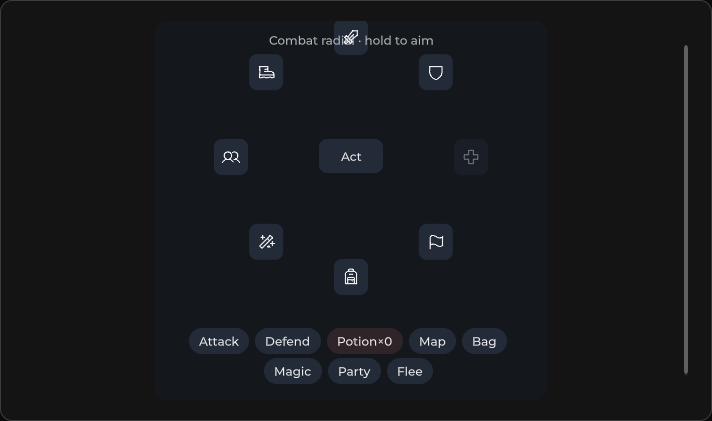
环形操作菜单 —— 中心激活元素 + 按 Radius 排列的选项。
包
SusKit · 分子(商业)
属性
| 名称 | 类型 | 默认值 | |
|---|---|---|---|
Items | Prop<List<RadialMenuItem>> | [] | v-model |
Model | Prop<bool> | false | v-model |
Disabled | Prop<bool> | false | v-model |
CenterText | Prop<string> | "+" | v-model |
Radius | Prop<float> | 72f | v-model |
插槽
| 名称 |
|---|
activator |
事件
| 名称 | 字段 | 载荷 |
|---|---|---|
Select | OnSelect | string |
Open | OnOpen | — |
Close | OnClose | — |
样式钩子
USS 类契约 — 无需改 C# 即可覆盖外观。状态通过这些类切换:
keyboard-focussus-hiddensus-radial-menusus-radial-menu__centersus-radial-menu__itemsus-radial-menu__item-tipsus-radial-menu__itemssus-radial-menu--disabledsus-radial-menu--opensus-slot
用法
Items 在代码中设置(List<RadialMenuItem>)。可通过 Model 或中心激活元素切换打开状态。
csharp
var radial = new SusRadialMenu();
radial.Items.Value = new List<SusRadialMenu.RadialMenuItem>
{
    new() { Label = "Home", Value = "home", Icon = "home" },
    new() { Label = "Party", Value = "party", Icon = "users" },
    new() { Label = "Shop", Value = "shop", Icon = "shop" },
    new() { Label = "Map", Value = "map", Icon = "map" },
};
radial.CenterText.Value = "+";
radial.Radius.Value = 72f;
radial.Model.Value = true; // open — segments visible
radial.OnSelect += value => { /* … */ };
xml
<template>
  <sus:SusRadialMenu :Model="Open.Value"
                     CenterText="+"
                     :Radius="Radius.Value"
                     :Disabled="Disabled.Value"
                     @select="OnSelect"
                     @open="OnOpen"
                     @close="OnClose" />
</template>

<script>
public Prop<bool> Open = new(false);
public Prop<float> Radius = new(72f);
public Prop<bool> Disabled = new(false);
void OnSelect(string value) { /* … */ }
void OnOpen() { }
void OnClose() { }
// Populate Items in code.
</script>| Prop | Role |
|---|---|
Items | List<RadialMenuItem> —— 扇形按钮 |
Model | 打开(true)/ 关闭 |
CenterText | 默认激活元素文本(插槽 activator 可覆盖) |
Radius | 中心到各选项的距离 |
Disabled | 阻止打开 / 选择 |
备注
- 项字段:
Label、Value、Icon、Disabled。 - 选中一个项会触发
OnSelect并关闭(Model = false)。 - 自定义激活元素:将内容放入插槽
activator,而不是依赖CenterText。