
SusChoiceDialog
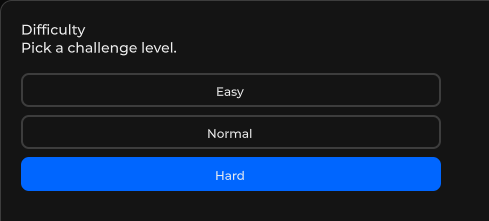
N-button choice card for modal dialogs — buttons render in order, awaitable ShowAsync resolves to the chosen index (or -1 on dismiss).
包
SusKit · Molecules(商业)
属性
| 名称 | 类型 | 默认值 | |
|---|---|---|---|
Title | Prop<string> | "Choose" | |
Message | Prop<string> | "" | v-model |
Buttons | Prop<string[]> | [] | |
ButtonIds | Prop<string[]> | [] |
插槽
没有插槽。
事件
| 名称 | 字段 | 载荷 |
|---|---|---|
Choose | OnChoose | int |
ChooseId | OnChooseId | string |
样式钩子
USS 类契约 — 无需改 C# 即可覆盖外观。状态通过这些类切换:
sus-choice-dialogsus-choice-dialog__btnsus-choice-dialog__buttonssus-hidden
用法
xml
<template>
  <sus:SusChoiceDialog Title="Delete item?"
                       Message="This cannot be undone."
                       :Buttons="Options.Value"
                       @choose="OnChoose" />
</template>

<script>
public Prop<string[]> Options = new(new[] { "Cancel", "Delete" });
void OnChoose(int index) { /* index == Options.Value.Length - 1 → confirmed */ }
</script>
csharp
// Awaitable helper — hosts the card inside a SusModal and resolves when it closes.
int index = await SusChoiceDialog.ShowAsync(
    "Delete item?", "This cannot be undone.", "Cancel", "Delete");
if (index == 1) { /* confirmed */ }
说明
Buttons中的最后一项渲染为主操作(elevated/primary色);其余项渲染为outlined/secondary— 把确认选项放在最后。OnChoose(int)以点击索引触发。ButtonIds是与Buttons平行的可选数组 — 当被点击按钮有匹配 id 时,会同时触发OnChooseId(string),调用方可按稳定 id 而非位置键控。- 静态
ShowAsync辅助通过SusModalService将卡片包进SusModal宿主;若通过模态 scrim 关闭且未点击按钮,则解析为-1。