
SusSnackbar
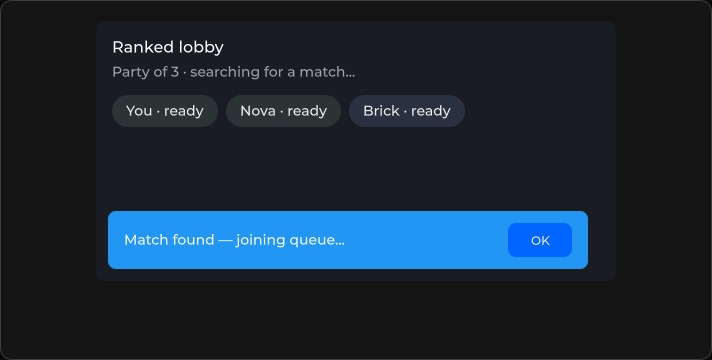
短暂提示 toast —— 文本、超时、位置,可选操作按钮。
包
SusKit · 原子(商业)
属性
| 名称 | 类型 | 默认值 | |
|---|---|---|---|
Text | Prop<string> | "" | v-model |
Kicker | Prop<string> | "" | v-model |
Variant | Prop<string> | "info" | v-model |
Timeout | Prop<int> | 5000 | v-model |
Location | Prop<string> | "bottom-center" | v-model |
CloseOnContentClick | Prop<bool> | false | v-model |
Vertical | Prop<bool> | false | v-model |
MultiLine | Prop<bool> | false | v-model |
ShowTimer | Prop<bool> | false | v-model |
CloseLabel | Prop<string> | "OK" | v-model |
Overlay | Prop<bool> | false | v-model |
StackOffset | Prop<float> | -1f | v-model |
插槽
| 名称 |
|---|
(默认) |
actions |
事件
| 名称 | 字段 | 载荷 |
|---|---|---|
Close | OnClose | — |
样式钩子
USS 类契约 — 无需改 C# 即可覆盖外观。状态通过这些类切换:
sus-hiddensus-slotsus-snackbarsus-snackbar__actionssus-snackbar__bodysus-snackbar__close-btnsus-snackbar__kickersus-snackbar__mainsus-snackbar__textsus-snackbar__timersus-snackbar--bottomsus-snackbar--centersus-snackbar--errorsus-snackbar--infosus-snackbar--leftsus-snackbar--multi-linesus-snackbar--overlaysus-snackbar--rightsus-snackbar--successsus-snackbar--topsus-snackbar--verticalsus-snackbar--warningsus-snackbar--with-timerunity-labelunity-text-element
用法
xml
<template>
  <sus:SusSnackbar Text="Saved"
                   Variant="success"
                   Timeout="4000"
                   Location="bottom-center"
                   CloseLabel="OK"
                   @close="OnClosed" />
</template>

<script>
void OnClosed() { /* … */ }
</script>
csharp
var toast = new SusSnackbar();
toast.Text.Value = "Connection lost";
toast.Variant.Value = "error";
toast.Timeout.Value = 5000;
toast.ShowTimer.Value = true;
toast.OnClose += () => { /* … */ };
变体
info · success · warning · error
Toast 堆叠偏移
SusSnack.Show(...) 的 toast 位于共享的 overlay 宿主中,由代码堆叠:每个 toast 都会得到行内 bottom。 行内样式优先于 USS,因此 toast 上的 USS bottom 永远不会生效。请改用偏移量移动堆叠:
| 方式 | 作用范围 |
|---|---|
toast 类上的 --sus-snackbar-stack-offset(px) | 带该类的每个 toast;未设置时为 24 px |
你自己的 SusSnackbar 上的 StackOffset | 该 toast;优先于 USS 属性 |
SusSnack.Show(text, variant, timeoutMs, className) | 仅该 toast 上的类 |
SusSnack.ContextClass | 每个 toast 上的类,直到重新设为 null |
overlay 宿主位于你的屏幕和皮肤根节点之外,因此以皮肤根类为前缀的规则无法作用到 toast。请把规则放进 皮肤的组件样式表层:
css
.hud-toast { --sus-snackbar-stack-offset: 216px; }csharp
SusSnack.ContextClass = "hud-toast";   // while the HUD is on screen
SusSnack.ContextClass = null;          // when it closes
备注
- 插槽
actions用于自定义按钮;默认关闭按钮使用CloseLabel。 - 需要堆叠多个 toast 时,优先使用队列 molecule(
SusSnackbarQueue)。