
SusCooldownWipe
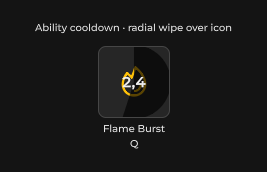
Cooldown overlay atom — radial pie wipe or bottom-up linear fill over an ability icon; 0 = ready, 1 = full remaining.
包
SusKit · Atoms(商业)
属性
| 名称 | 类型 | 默认值 | |
|---|---|---|---|
Progress01 | Prop<float> | 0f | |
Shape | Prop<string> | "Radial" |
插槽
没有插槽。
事件
没有公开事件。
样式钩子
USS 类契约 — 无需改 C# 即可覆盖外观。状态通过这些类切换:
sus-cooldown-wipesus-cooldown-wipe__canvassus-cooldown-wipe__linearsus-cooldown-wipe--activesus-cooldown-wipe--linearsus-cooldown-wipe--radialsus-hidden
用法
xml
<template>
  <ui:VisualElement class="ability-icon">
    <sus:SusIcon Icon="fire" />
    <sus:SusCooldownWipe :Progress01="Cooldown.Value" Shape="Radial" />
  </ui:VisualElement>
</template>

<script>
// 0.4 = 40% of the cooldown still remaining; counts down to 0 (ready).
public Prop<float> Cooldown = new(0.4f);
</script>
csharp
var wipe = new SusCooldownWipe();
wipe.Shape.Value = "Linear";
wipe.Progress01.Value = 1f; // just triggered — full remaining
形状
Radial · Linear
说明
- 将 wipe 绝对定位在要变暗的图标之上 — 它填满父级 rect,并忽略指针事件(
pickingMode = Ignore),因此不会挡住图标自身的 click/hover。 Radial用Painter2D从 12 点钟方向顺时针绘制饼形楔;Linear按高度百分比自下锚定增长暗色覆盖 — 与它所替代的旧版SusAbilitySlot冷却覆盖视觉契约相同。Progress01 <= 0.01时完全隐藏覆盖,因此就绪技能显示干净图标,无残留像素。