
SusTable
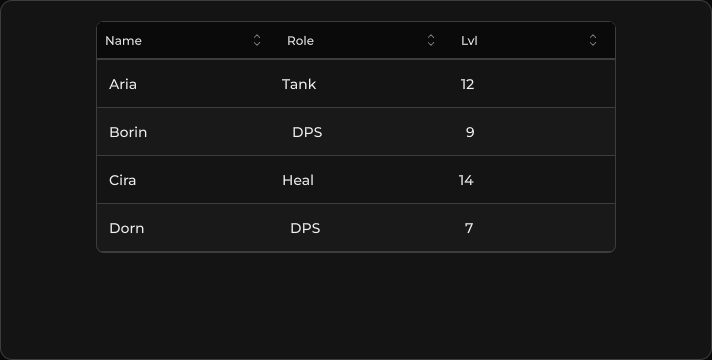
轻量表头 + 可滚动行 + 分页页脚 — 与 DataTable 相同的 SusTableController,没有工具栏 / 类型化单元格外壳。
包
SusKit · 数据(商业)
属性
| 名称 | 类型 | 默认值 | |
|---|---|---|---|
Controller | Prop<SusTableController> | new SusTableController() | v-model |
插槽
没有插槽。
事件
没有公开事件。
样式钩子
USS 类契约 — 无需改 C# 即可覆盖外观。状态通过这些类切换:
keyboard-focussus-buttonsus-healthbarsus-hiddensus-tablesus-table__action-btnsus-table__bodysus-table__cellsus-table__cell--actionssus-table__cell--align-centersus-table__cell--align-endsus-table__cell--boxedsus-table__cell--customsus-table__cell--descriptionsus-table__cell--ellipsissus-table__cell--numbersus-table__cell--progresssus-table__cell--segmentssus-table__cell--stretchsus-table__cell--two-linesus-table__cell-subsus-table__cell-titlesus-table__footersus-table__footer-actionssus-table__footer-btnsus-table__footer-infosus-table__headersus-table__header-cellsus-table__header-cell--stretchsus-table__header-rowsus-table__header-titlesus-table__header-title--align-centersus-table__header-title--align-endsus-table__header-title--sortablesus-table__media--clipsus-table__media--roundedsus-table__rowsus-table__row--hoverablesus-table__row--selectedsus-table__row--stripedsus-table__rowssus-table__segmentsus-table__segment--onsus-table__segmentssus-table__segments--fullsus-table__segments-countsus-table__sort-btnsus-table__sort-btn--active
用法
在控制器上配置列和条目,然后把它赋给视图。
csharp
var ctrl = new SusTableController();
ctrl.SetColumns(new List<ColumnDef>
{
    new() { Key = "name", Title = "Name", Sortable = true },
    new() { Key = "role", Title = "Role", Sortable = true },
    new() { Key = "lvl", Title = "Lvl", Sortable = true },
});
ctrl.SetItems(new List<object>
{
    new Dictionary<string, object> { ["name"] = "Aria", ["role"] = "Tank", ["lvl"] = 12 },
    new Dictionary<string, object> { ["name"] = "Borin", ["role"] = "DPS", ["lvl"] = 9 },
    new Dictionary<string, object> { ["name"] = "Cira", ["role"] = "Heal", ["lvl"] = 14 },
});
ctrl.SetItemsPerPage(5);

var table = new SusTable();
table.Controller.Value = ctrl;
xml
<template>
  <sus:SusTable :Controller="TableCtrl.Value" />
</template>

<script>
public Prop<SusTableController> TableCtrl = new(new());
// Populate TableCtrl columns/items in code (see above).
</script>| Prop | 作用 |
|---|---|
Controller | SusTableController — 列、条目、排序、分页 |
说明
- 比
SusDataTable更简单:没有 toolbar 插槽,没有 kind 预设外壳。 - 单元格来自与
SusDataTable相同的列工厂,因此双行列(SusHeaders.TwoLine,类sus-table__cell-title/sus-table__cell-sub)在这里同样可用 — 参见 双行单元格。 - 当
TotalPages > 1时出现分页页脚。 - 需要类型化单元格 / 全局搜索 / 选择列时 — 使用 SusDataTable。