
SusCooldownWipe
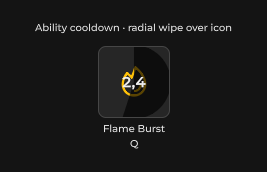
Cooldown overlay atom — radial pie wipe or bottom-up linear fill over an ability icon; 0 = ready, 1 = full remaining.
Package
SusKit · Atoms (commercial)
Props
| Name | Type | Default | |
|---|---|---|---|
Progress01 | Prop<float> | 0f | |
Shape | Prop<string> | "Radial" |
Slots
No slots.
Events
No public events.
Style hooks
USS class contract — override appearance without touching C#. States toggle via these classes:
sus-cooldown-wipesus-cooldown-wipe__canvassus-cooldown-wipe__linearsus-cooldown-wipe--activesus-cooldown-wipe--linearsus-cooldown-wipe--radialsus-hidden
Usage
xml
<template>
  <ui:VisualElement class="ability-icon">
    <sus:SusIcon Icon="fire" />
    <sus:SusCooldownWipe :Progress01="Cooldown.Value" Shape="Radial" />
  </ui:VisualElement>
</template>

<script>
// 0.4 = 40% of the cooldown still remaining; counts down to 0 (ready).
public Prop<float> Cooldown = new(0.4f);
</script>
csharp
var wipe = new SusCooldownWipe();
wipe.Shape.Value = "Linear";
wipe.Progress01.Value = 1f; // just triggered — full remaining
Shape
Radial · Linear
Notes
- Absolutely-position the wipe over the icon it darkens — it fills its parent's rect and ignores pointer events (
pickingMode = Ignore), so it never blocks the icon's own click/hover. Radialdraws aPainter2Dpie wedge clockwise from 12 o'clock;Lineargrows a bottom-anchored dark overlay by height percent — same visual contract as the legacySusAbilitySlotcooldown overlay it replaces.Progress01 <= 0.01hides the overlay entirely, so a ready ability shows a clean icon with no residual pixel.