
SusSnackbar
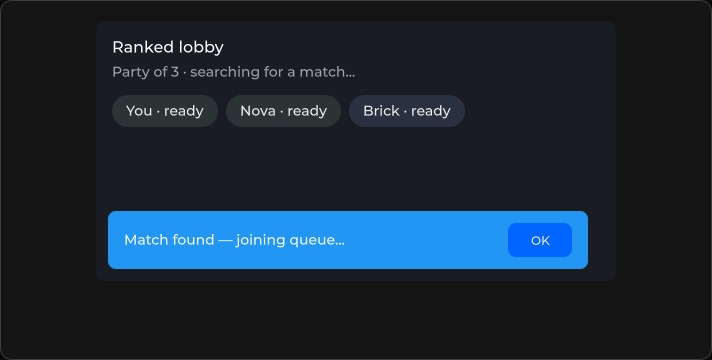
Transient toast — text, timeout, location, optional actions.
Package
SusKit · Atoms (commercial)
Props
| Name | Type | Default | |
|---|---|---|---|
Text | Prop<string> | "" | v-model |
Kicker | Prop<string> | "" | v-model |
Variant | Prop<string> | "info" | v-model |
Timeout | Prop<int> | 5000 | v-model |
Location | Prop<string> | "bottom-center" | v-model |
CloseOnContentClick | Prop<bool> | false | v-model |
Vertical | Prop<bool> | false | v-model |
MultiLine | Prop<bool> | false | v-model |
ShowTimer | Prop<bool> | false | v-model |
CloseLabel | Prop<string> | "OK" | v-model |
Overlay | Prop<bool> | false | v-model |
StackOffset | Prop<float> | -1f | v-model |
Slots
| Name |
|---|
(default) |
actions |
Events
| Name | Field | Payload |
|---|---|---|
Close | OnClose | — |
Style hooks
USS class contract — override appearance without touching C#. States toggle via these classes:
sus-hiddensus-slotsus-snackbarsus-snackbar__actionssus-snackbar__bodysus-snackbar__close-btnsus-snackbar__kickersus-snackbar__mainsus-snackbar__textsus-snackbar__timersus-snackbar--bottomsus-snackbar--centersus-snackbar--errorsus-snackbar--infosus-snackbar--leftsus-snackbar--multi-linesus-snackbar--overlaysus-snackbar--rightsus-snackbar--successsus-snackbar--topsus-snackbar--verticalsus-snackbar--warningsus-snackbar--with-timerunity-labelunity-text-element
Usage
xml
<template>
  <sus:SusSnackbar Text="Saved"
                   Variant="success"
                   Timeout="4000"
                   Location="bottom-center"
                   CloseLabel="OK"
                   @close="OnClosed" />
</template>

<script>
void OnClosed() { /* … */ }
</script>
csharp
var toast = new SusSnackbar();
toast.Text.Value = "Connection lost";
toast.Variant.Value = "error";
toast.Timeout.Value = 5000;
toast.ShowTimer.Value = true;
toast.OnClose += () => { /* … */ };
Variant
info · success · warning · error
Toast stack offset
SusSnack.Show(...) toasts live in the shared overlay host and are stacked in code: each one gets an inline bottom. Inline styles beat USS, so a USS bottom on a toast never takes effect. Move the stack with the offset instead:
| Way | Scope |
|---|---|
--sus-snackbar-stack-offset (px) on the toast's class | Every toast with the class; unset = 24 px |
StackOffset on your own SusSnackbar | That toast; wins over the USS property |
SusSnack.Show(text, variant, timeoutMs, className) | Classes on that toast only |
SusSnack.ContextClass | Classes on every toast until set back to null |
The overlay host is outside your screen and skin root, so a rule prefixed with the skin's root class does not reach a toast. Ship the rule in the skin's component sheet layer:
css
.hud-toast { --sus-snackbar-stack-offset: 216px; }csharp
SusSnack.ContextClass = "hud-toast";   // while the HUD is on screen
SusSnack.ContextClass = null;          // when it closes
Notes
- Slot
actionsfor custom buttons; default close usesCloseLabel. - Prefer the queue molecule (
SusSnackbarQueue) when stacking multiple toasts.