
SusTable
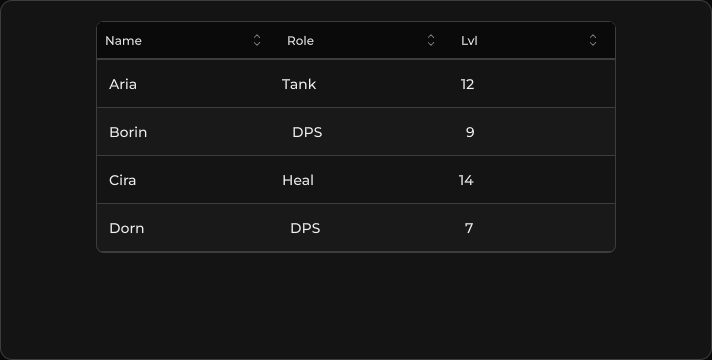
Lightweight header + scrollable rows + pagination footer — same SusTableController as DataTable, without toolbar / typed-cell chrome.
Package
SusKit · Data (commercial)
Props
| Name | Type | Default | |
|---|---|---|---|
Controller | Prop<SusTableController> | new SusTableController() | v-model |
Slots
No slots.
Events
No public events.
Style hooks
USS class contract — override appearance without touching C#. States toggle via these classes:
keyboard-focussus-buttonsus-healthbarsus-hiddensus-tablesus-table__action-btnsus-table__bodysus-table__cellsus-table__cell--actionssus-table__cell--align-centersus-table__cell--align-endsus-table__cell--boxedsus-table__cell--customsus-table__cell--descriptionsus-table__cell--ellipsissus-table__cell--numbersus-table__cell--progresssus-table__cell--segmentssus-table__cell--stretchsus-table__cell--two-linesus-table__cell-subsus-table__cell-titlesus-table__footersus-table__footer-actionssus-table__footer-btnsus-table__footer-infosus-table__headersus-table__header-cellsus-table__header-cell--stretchsus-table__header-rowsus-table__header-titlesus-table__header-title--align-centersus-table__header-title--align-endsus-table__header-title--sortablesus-table__media--clipsus-table__media--roundedsus-table__rowsus-table__row--hoverablesus-table__row--selectedsus-table__row--stripedsus-table__rowssus-table__segmentsus-table__segment--onsus-table__segmentssus-table__segments--fullsus-table__segments-countsus-table__sort-btnsus-table__sort-btn--active
Usage
Wire columns and items on the controller, then assign it to the view.
csharp
var ctrl = new SusTableController();
ctrl.SetColumns(new List<ColumnDef>
{
    new() { Key = "name", Title = "Name", Sortable = true },
    new() { Key = "role", Title = "Role", Sortable = true },
    new() { Key = "lvl", Title = "Lvl", Sortable = true },
});
ctrl.SetItems(new List<object>
{
    new Dictionary<string, object> { ["name"] = "Aria", ["role"] = "Tank", ["lvl"] = 12 },
    new Dictionary<string, object> { ["name"] = "Borin", ["role"] = "DPS", ["lvl"] = 9 },
    new Dictionary<string, object> { ["name"] = "Cira", ["role"] = "Heal", ["lvl"] = 14 },
});
ctrl.SetItemsPerPage(5);

var table = new SusTable();
table.Controller.Value = ctrl;
xml
<template>
  <sus:SusTable :Controller="TableCtrl.Value" />
</template>

<script>
public Prop<SusTableController> TableCtrl = new(new());
// Populate TableCtrl columns/items in code (see above).
</script>| Prop | Role |
|---|---|
Controller | SusTableController — columns, items, sort, page |
Notes
- Simpler than
SusDataTable: no toolbar slot, no kind-preset chrome. - Cells come from the same column factory as
SusDataTable, so two-line columns (SusHeaders.TwoLine, classessus-table__cell-title/sus-table__cell-sub) work here too — see Two-line cells. - Pagination footer appears when
TotalPages > 1. - For typed cells / global search / select column — use SusDataTable.