
SusDiagnosticsPanel
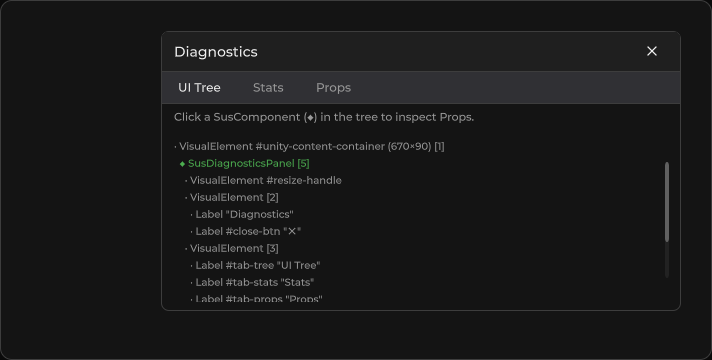
Editor / development overlay — UI tree, stats, and props inspector for Sus components.
Package
SusKit · Devtools (commercial)
Props
| Name | Type | Default | |
|---|---|---|---|
Visible | Prop<bool> | false | |
RefreshInterval | Prop<float> | 2f |
Slots
No slots.
Events
No public events.
Style hooks
USS class contract — override appearance without touching C#. States toggle via these classes:
sus-diag-panelsus-diag-panel__close-btnsus-diag-panel__contentsus-diag-panel__dumpsus-diag-panel__headersus-diag-panel__header-titlesus-diag-panel__header-title--sectionsus-diag-panel__hintsus-diag-panel__resizesus-diag-panel__stat-keysus-diag-panel__stat-rowsus-diag-panel__stat-valsus-diag-panel__tabsus-diag-panel__tab--activesus-diag-panel__tab-contentsus-diag-panel__tabssus-diag-panel__tipsus-diag-panel__tree-rowsus-diag-panel__tree-row--fadedsus-diag-panel__tree-row--hiddensus-diag-panel__tree-row--selectedsus-diag-panel__tree-row--sussus-diag-panel__tree-row--vesus-hidden
Usage
Set RootElement to the tree to inspect, then toggle Visible.
csharp
var panel = new SusDiagnosticsPanel();
panel.RootElement = canvas; // or app root VisualElement
panel.Visible.Value = true;
panel.RefreshInterval.Value = 2f;
host.Add(panel);
xml
<template>
  <sus:SusDiagnosticsPanel :Visible="Show.Value"
                           :RefreshInterval="Interval.Value" />
</template>

<script>
public Prop<bool> Show = new(true);
public Prop<float> Interval = new(2f);
// Assign RootElement in code (panel.RootElement = …).
</script>| Prop / field | Role |
|---|---|
Visible | Show / hide the panel |
RefreshInterval | Auto-refresh period (seconds); tree skips rebuild if snapshot unchanged |
RootElement | Root VisualElement to walk (code) |
TargetComponent | Optional focus for Props tab (code) |
Notes
- Tabs: UI Tree · Stats · Props — click a SusComponent (◆) in the tree to inspect props.
- Intended for Editor / Development builds; not a buyer runtime surface.
- Resize via the left-edge handle; close control sets
Visible=false.