
SusBottomSheet
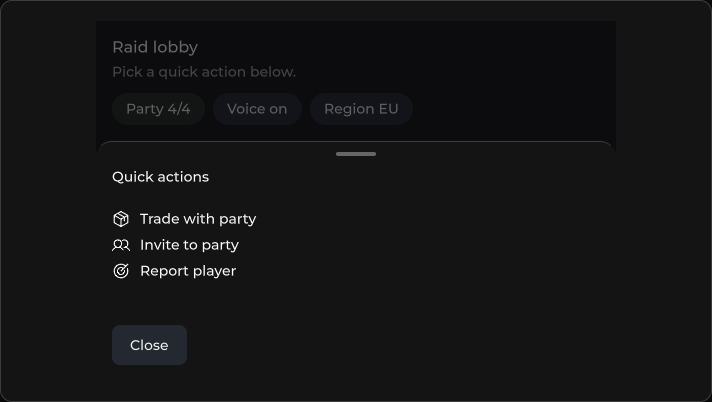
Bottom action sheet with backdrop, height, and header / body / footer slots.
Package
SusKit · Molecules (commercial)
Props
| Name | Type | Default | |
|---|---|---|---|
Model | Prop<bool> | false | v-model |
Persistent | Prop<bool> | false | v-model |
Inset | Prop<bool> | false | v-model |
Height | Prop<float> | 280f | v-model |
Slots
| Name |
|---|
header |
(default) |
footer |
Events
| Name | Field | Payload |
|---|---|---|
Opened | OnOpened | — |
Closed | OnClosed | — |
BackdropClick | OnBackdropClick | — |
Style hooks
USS class contract — override appearance without touching C#. States toggle via these classes:
sus-bottom-sheetsus-bottom-sheet__backdropsus-bottom-sheet__bodysus-bottom-sheet__footersus-bottom-sheet__handlesus-bottom-sheet__headersus-bottom-sheet__panelsus-bottom-sheet--insetsus-bottom-sheet--opensus-hiddensus-slot
Usage
xml
<template>
  <sus:SusBottomSheet :Model="Open.Value"
                      Height="200"
                      :Persistent="Persistent.Value"
                      @opened="OnOpened"
                      @closed="OnClosed">
    <template #header>
      <ui:Label text="Quick actions" />
    </template>
    <ui:Label text="Trade · Invite · Report" />
    <template #footer>
      <sus:SusButton Text="Close" Variant="text" @click="Open.Value = false" />
    </template>
  </sus:SusBottomSheet>
</template>

<script>
public Prop<bool> Open = new(false);
public Prop<bool> Persistent = new(false);
void OnOpened() { }
void OnClosed() { }
</script>
csharp
var sheet = new SusBottomSheet();
sheet.Model.Value = true;
sheet.Height.Value = 200f;
sheet.OnOpened += () => { /* … */ };
sheet.Slot("header")?.Add(new Label("Quick actions"));
sheet.Slot("default")?.Add(new Label("Trade · Invite · Report"));
// Prefer Slot("default") over Add() — Add() lands on the overlay root.
sheet.Open(); // or sheet.Model.Value = true;
Notes
Persistentkeeps the sheet open on backdrop / Escape.Insetpulls the panel in from the screen edges.