
SusHotbar
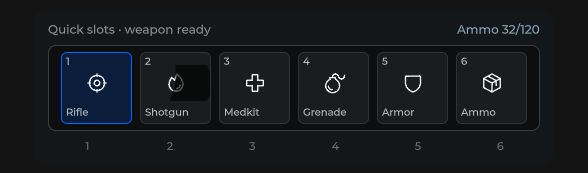
Inventory shortcut strip — N slots with key labels, selection chrome, digits 1…N / arrows / Enter.
Package
SusGame · HUD (commercial)
Props
| Name | Type | Default | |
|---|---|---|---|
SlotCount | Prop<int> | 6 | |
SelectedIndex | Prop<int> | 0 | |
CooldownStyle | Prop<string> | "Radial" |
Slots
No slots.
Events
| Name | Field | Payload |
|---|---|---|
SlotActivated | OnSlotActivated | int |
SelectionChanged | OnSelectionChanged | int |
Style hooks
USS class contract — override appearance without touching C#. States toggle via these classes:
sus-hiddensus-hotbarsus-hotbar__cd-wipesus-hotbar__iconsus-hotbar__icon-hostsus-hotbar__keysus-hotbar__slotsus-hotbar__slot--selectedsus-hotbar__title
Usage
csharp
var bar = new SusHotbar();
bar.SlotCount.Value = 6;
bar.SelectedIndex.Value = 0;
bar.OnSlotActivated += i => { /* use item */ };
bar.OnSelectionChanged += i => { /* highlight */ };

bar.SetSlotIcon(0, "potion");
bar.SetSlotLabel(0, "Heal");
bar.SetSlotIcon(1, "bomb");
bar.SetSlotLabel(1, "Grenade");
xml
<template>
  <sus:SusHotbar :SlotCount="Slots.Value"
                 :SelectedIndex="Selected.Value"
                 @slot-activated="OnSlotActivated"
                 @selection-changed="OnSelectionChanged" />
</template>

<script>
public Prop<int> Slots = new(6);
public Prop<int> Selected = new(0);
void OnSlotActivated(int index) { /* … */ }
void OnSelectionChanged(int index) { /* … */ }
// Call SetSlotIcon / SetSlotLabel after mount (slots rebuild on SlotCount).
</script>| Prop / API | Role |
|---|---|
SlotCount | Slots 1…10 (default 6) |
SelectedIndex | Selected slot (visual + keyboard) |
SetSlotIcon(i, name) | Icon for slot |
SetSlotLabel(i, text) | Title under icon |
OnSlotActivated | Click / digit / Enter |
OnSelectionChanged | Selection moved |
Notes
- Slots rebuild when
SlotCountchanges — set icons/labels after rebuild/mount. - Keyboard: digits
1…N, Home/End, arrows (roving focus), Space/Enter activate. - For combat abilities prefer SusAbilityBar; hotbar is the inventory shortcut contract.