
SusHudMinimapFrame
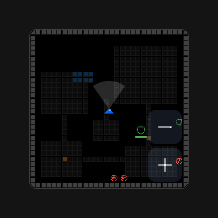
Square chrome frame for a minimap widget — placeholder text or slotted / injected content.
Package
SusGame · HUD (commercial)
Props
| Name | Type | Default | |
|---|---|---|---|
PlaceholderText | Prop<string> | "Minimap" | |
ShowPlaceholder | Prop<bool> | true | |
FrameSize | Prop<float> | 160f | |
Shape | Prop<string> | "square" | |
Size | Prop<string> | "default" |
Slots
| Name |
|---|
(default) |
Events
No public events.
Style hooks
USS class contract — override appearance without touching C#. States toggle via these classes:
sus-hiddensus-hud-minimap-framesus-hud-minimap-frame__contentsus-hud-minimap-frame__placeholdersus-hud-minimap-frame--circlesus-hud-minimap-frame--squaresus-minimap--fit
Usage
csharp
var frame = new SusHudMinimapFrame();
frame.FrameSize.Value = 140f;
frame.PlaceholderText.Value = "Minimap";
frame.ShowPlaceholder.Value = true;
// After your map visual exists:
// frame.SetContent(minimapRoot); // clears placeholder
xml
<template>
  <sus:SusHudMinimapFrame :PlaceholderText="Placeholder.Value"
                          :ShowPlaceholder="ShowPh.Value"
                          :FrameSize="Size.Value">
    <!-- Optional default slot: your minimap VisualElement tree -->
  </sus:SusHudMinimapFrame>
</template>

<script>
public Prop<string> Placeholder = new("Minimap");
public Prop<bool> ShowPh = new(true);
public Prop<float> Size = new(140f);
</script>| Prop / API | Role |
|---|---|
PlaceholderText | Label when empty (default Minimap) |
ShowPlaceholder | Show / hide placeholder |
FrameSize | Width & height (≤40 falls back to 140) |
| default slot | Nested content inside the frame |
SetContent(ve) | Replace host children + hide placeholder |
Notes
- Frame is chrome only — paint / fog / icons live in your content or SusMinimap (when used).
SetContentsetsShowPlaceholder = falseafter injecting.