
SusHudUnitRail
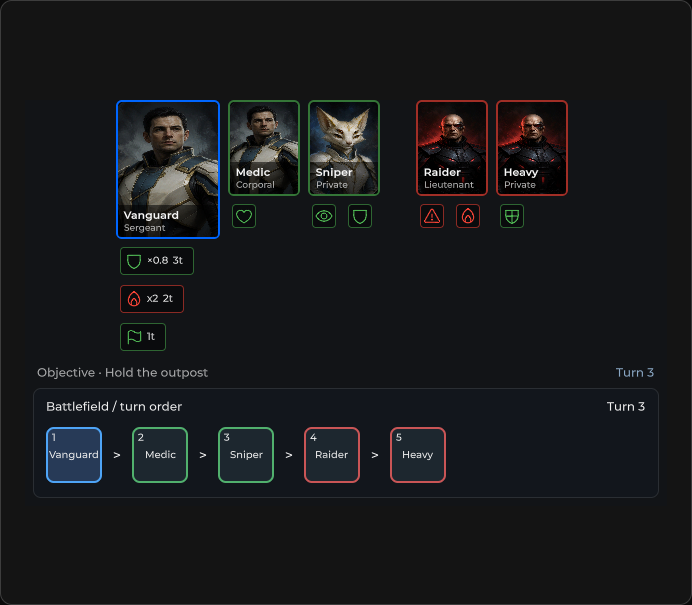
Top unit strip — allies left, enemies right; reconciles SusHudUnitCard children by id.
Package
SusGame · HUD (commercial)
Props
| Name | Type | Default | |
|---|---|---|---|
ShowEnemies | Prop<bool> | true | |
Orientation | Prop<string> | "row" | |
Justify | Prop<string> | "center" |
Slots
No slots.
Events
| Name | Field | Payload |
|---|---|---|
UnitSelected | OnUnitSelected | SusHudUnitCard |
Style hooks
USS class contract — override appearance without touching C#. States toggle via these classes:
breakpoint-smsus-hiddensus-hud-unit-cardsus-hud-unit-card__portraitsus-hud-unit-card--activesus-hud-unit-railsus-hud-unit-rail__scrollsus-hud-unit-rail__sidesus-hud-unit-rail__side--alliessus-hud-unit-rail__side--enemiessus-hud-unit-rail__spacersus-hud-unit-rail__spacer--emptysus-hud-unit-rail--allies-onlysus-hud-unit-rail--belt-clampedsus-hud-unit-rail--belt-tightsus-hud-unit-rail--columnsus-hud-unit-rail--spreadsus-hud-unit-rail--tight
Usage
List-driven: SetUnits / SetAllies / SetEnemies. XML only toggles enemy side.
csharp
var rail = new SusHudUnitRail();
rail.ShowEnemies.Value = true;
rail.OnUnitSelected += card => { /* select */ };

rail.SetUnits(new List<SusHudUnitCardData>
{
    new() { Id = "a1", Name = "Mara", Ally = true, Active = true, ImageSrc = "portraits/mara" },
    new() { Id = "e1", Name = "Raider", Ally = false, Icon = "units/raider" },
});

rail.SetActiveUnit("a1");
rail.UpdateUnit(new SusHudUnitCardData { Id = "a1", Name = "Mara", Hp = 30f, MaxHp = 50f, Ally = true });
rail.SetUnitEffects("a1", new List<SusStatusEffectData>
{
    new() { Id = "burn", Icon = "flame", IsDebuff = true, TurnsLeft = 2 },
});
xml
<template>
  <sus:SusHudUnitRail :ShowEnemies="ShowEnemies.Value"
                      @unit-selected="OnUnitSelected" />
</template>

<script>
public Prop<bool> ShowEnemies = new(true);
void OnUnitSelected(SusHudUnitCard card) { /* … */ }
// Call SetUnits / SetAllies / SetEnemies after mount.
</script>| Prop / API | Role |
|---|---|
ShowEnemies | Hide enemy side + spacer (deployment / allies-only) |
SetUnits(list) | Split by Ally → both sides |
SetAllies / SetEnemies | Partial side updates |
SetActiveUnit(id) | Toggle Active on matching cards |
UpdateUnit(data) | Patch one existing card |
SetUnitEffects(id, effects) | Forward to card |
FindCard / ClearUnits | Lookup / wipe |
AllyCards · EnemyCards | Live card lists |
OnUnitSelected | Bubbled from child OnSelected |
Justify | "center" (default) or "spread" — see below |
Justify
Justify = "spread" puts allies at the start edge and enemies at the end edge, and the empty spacer fills the middle; the root gets sus-hud-unit-rail--spread. The default "center" keeps both sides grouped around the center. An item mounted in the center of the rail is laid out the same in both modes. Use spread instead of skin rules that stretch the spacer — for example when the objective panel moves out of the rail into a corner zone.
csharp
rail.Justify.Value = "spread";Notes
- Empty until fill API — in-place reconcile avoids remount storms on
SusImg/ icons. SetUnitsforcesAllytrue/false per side when reconciling.- Pair with SusHudUnitCard docs for payload fields.