
SusLobbyScreenContent
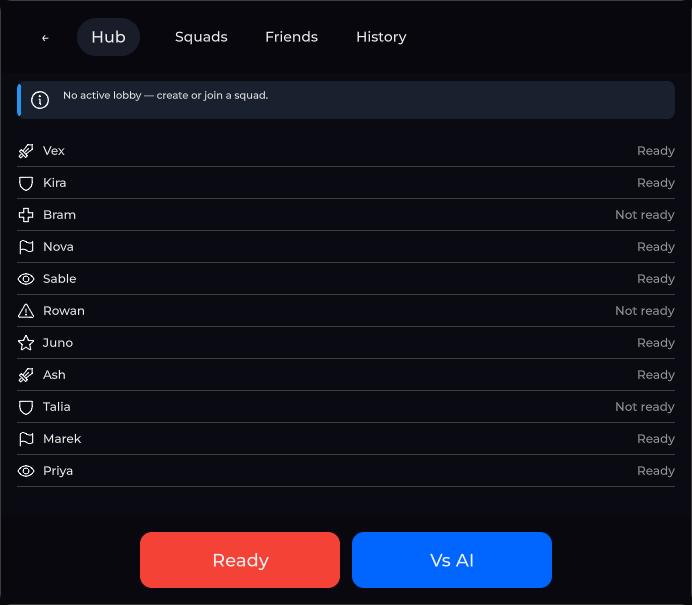
Hub / lobby shell — back, title chip, tabs, empty alert, child-view host, Ready + Vs AI footer actions.
Package
SusGame · Screens (commercial)
Props
| Name | Type | Default | |
|---|---|---|---|
Title | Prop<string> | "Hub" | |
TitleStyle | Prop<string> | "chip" | |
Crumbs | Prop<List<string>> | [] | |
EmptyText | Prop<string> | "No data" | |
CanAct | Prop<bool> | false | |
HasData | Prop<bool> | false | |
ActionLabel | Prop<string> | "Ready" | |
SoloActionLabel | Prop<string> | "Vs AI" | |
IsReady | Prop<bool> | false | |
StatusKicker | Prop<string> | "" | |
StatusIsError | Prop<bool> | false | |
StatusLink | Prop<string> | "" | |
BlockReason | Prop<string> | "" |
Slots
Events
| Name | Field | Payload |
|---|---|---|
StatusLinkClicked | OnStatusLinkClicked | — |
Style hooks
USS class contract — override appearance without touching C#. States toggle via these classes:
sc-lobby-footersc-lobby-headersus-hiddensus-lobby-screensus-lobby-screen__actionsus-lobby-screen__action-flashsus-lobby-screen__action-linesus-lobby-screen__action-sweepsus-lobby-screen__back-btnsus-lobby-screen__block-reasonsus-lobby-screen__child-viewsus-lobby-screen__contentsus-lobby-screen__crumbssus-lobby-screen__empty-textsus-lobby-screen__footer-centersus-lobby-screen__footer-endsus-lobby-screen__footer-end-hostsus-lobby-screen__footer-startsus-lobby-screen__footer-start-hostsus-lobby-screen__marksus-lobby-screen__rowsus-lobby-screen__row-iconsus-lobby-screen__row-labelsus-lobby-screen__row-valuesus-lobby-screen__row-value--flashsus-lobby-screen__rowssus-lobby-screen__sectionsus-lobby-screen__section-asidesus-lobby-screen__section-bodysus-lobby-screen__section-dimsus-lobby-screen__section-dim--autosus-lobby-screen__section-dim--onsus-lobby-screen__section-footsus-lobby-screen__section-mainsus-lobby-screen__solo-action-btnsus-lobby-screen__statussus-lobby-screen__status-bodysus-lobby-screen__status-kickersus-lobby-screen__status-linksus-lobby-screen__status-textsus-lobby-screen__tabssus-lobby-screen__titlesus-lobby-screen__title-textsus-lobby-screen__title-wrapsus-lobby-screen__walletsus-lobby-screen--limbosus-lobby-screen--title-text
Usage
Bind chrome props; fill Tabs / ChildViewHost from host or child views. Gate footer with CanAct.
<template>
  <sus:SusLobbyScreenContent
    :Title="Title.Value"
    :EmptyText="Empty.Value"
    :CanAct="Ready.Value"
    :ActionLabel="Act.Value"
    :SoloActionLabel="Solo.Value"
  />
</template>

<script>
public Prop<string> Title = new("Hub");
public Prop<string> Empty = new("No data");
public Prop<bool> Ready = new(false);
public Prop<string> Act = new("Ready");
public Prop<string> Solo = new("Vs AI");
</script>var lobby = new SusLobbyScreenContent();
lobby.Title.Value = "Multiplayer";
lobby.EmptyText.Value = "No parties";
lobby.CanAct.Value = true;
lobby.ActionLabel.Value = "Ready";
lobby.SoloActionLabel.Value = "Vs AI";
// After mount:
lobby.Tabs.Items.Value = new List<SusTabs.TabItem> {
new() { Title = "Parties", Value = "parties" },
new() { Title = "Friends", Value = "friends" },
};
lobby.ChildViewHost.Add(myListView);
lobby.BackBtn.OnClick += () => { /* back */ };
lobby.ActionBtn.OnClick += () => { /* ready */ };
lobby.SoloActionBtn.OnClick += () => { /* vs AI */ };| Prop / API | Role |
|---|---|
Title | Header chip label |
EmptyText | Empty alert; empty string → hidden |
CanAct | Enables/disables both footer buttons (Disabled = !CanAct) |
ActionLabel / SoloActionLabel | Ready / Vs AI labels |
HasData | true when the lobby has a roster; the empty alert shows only while HasData is false and EmptyText is non-empty. SetRows sets it for you (true for a non-empty list) |
TitleStyle | "chip" (default) or "text" — see Header |
Crumbs | Breadcrumb trail above the title; last entry = current page; empty → hidden |
SetWallet(entries) / Wallet | Currency strip in the header (SusWallet); hidden until it gets an entry |
BlockReason | Why the main action is blocked, shown in the footer end zone; empty → hidden |
FooterStart / FooterEnd | Empty row hosts for your own footer content, left and right of the actions |
BackBtn / Tabs / EmptyAlert / ActionBtn / SoloActionBtn | Host wiring |
ActionWrap | Wrapper around ActionBtn with three decor nodes, off by default |
ChildViewHost | Mount list/detail content here |
Every addition above is empty or hidden by default, so a lobby that does not set them looks and measures exactly as before.
Header: title style, breadcrumbs, wallet
The header row is back button, brand mark, title block, tabs, wallet.
- Title style.
TitleStyle = "chip"shows the title as a tonal chip (sus-lobby-screen__title)."text"shows it as a plain heading (sus-lobby-screen__title-text). Both nodes always exist and both followTitle. The only switch is the root classsus-lobby-screen--title-text, so a skin can restyle either node without code. Any other value falls back to"chip". - Breadcrumbs.
Crumbsis aList<string>in path order. It feeds a kit SusBreadcrumbs (sus-lobby-screen__crumbs, divider//) stacked over the title insidesus-lobby-screen__title-wrap. The kit marks the last entrysus-breadcrumbs__item--current. An empty list hides the trail. - Wallet.
SetWallet(entries)fills the currency strip (sus-lobby-screen__wallet) after the tabs and shows it. A null or empty list hides it again. To pulse a value after a balance change, callWallet.FlashValue(code).
lobby.TitleStyle.Value = "text";
lobby.Crumbs.Value = new List<string> { "Hub", "Squads" };
lobby.SetWallet(new[]
{
    SusWallet.SusWalletEntry.Of("gold", "Gold", "12 400", "coin"),
    SusWallet.SusWalletEntry.Of("gems", "Gems", "35", "diamond"),
});
lobby.Wallet.FlashValue("gold");
SusLobbyScreen (the router screen) mirrors these as TitleStyle, Crumbs, BlockReason and Wallet props. It also has SetWallet(entries) and FlashWalletValue(code).
Footer: zones, block reason, action decor
The footer (sc-lobby-footer) has three zones:
| Zone | Class | Contents |
|---|---|---|
| Start | sus-lobby-screen__footer-start | FooterStart host (sus-lobby-screen__footer-start-host) |
| Center | sus-lobby-screen__footer-center | ActionWrap (Ready) and SoloActionBtn |
| End | sus-lobby-screen__footer-end | BlockReason label (sus-lobby-screen__block-reason), then the FooterEnd host (sus-lobby-screen__footer-end-host) |
The start and end zones split the free width equally. The center zone keeps its natural size, so the actions stay centred whether or not the edges have content. Add your own elements to FooterStart / FooterEnd. Spacing of that content is up to you: the hosts add none.
BlockReason is plain text such as "Waiting for 2 players". It does not depend on CanAct: you decide when a reason is worth showing, and an empty string hides it.
lobby.CanAct.Value = false;
lobby.BlockReason.Value = "Waiting for 2 players";
lobby.FooterStart.Add(new Label("Region: EU"));
ActionWrap (sus-lobby-screen__action, position: relative) holds ActionBtn and three decor siblings drawn over it: sus-lobby-screen__action-flash, sus-lobby-screen__action-sweep and sus-lobby-screen__action-line. They fill the wrapper, ignore picking (clicks still reach the button) and are display: none by default. The package ships no animation. A skin turns a node on under its own class:
.my-skin .sus-lobby-screen__action-line {
    display: flex;
    border-bottom-width: 2px;
    border-bottom-color: var(--sk-color-primary);
}
Skin hooks for common overrides
If your skin used to rebuild parts of this screen by hand, use the built-in hooks instead:
| Custom workaround | Built-in hook |
|---|---|
| Hide the title chip and add your own title label | TitleStyle = "text" → sus-lobby-screen__title-text |
| Your own title column with a breadcrumb row | Crumbs → sus-lobby-screen__title-wrap, sus-lobby-screen__crumbs (sus-breadcrumbs__divider, sus-breadcrumbs__item--current) |
| Side columns added around the footer actions | sus-lobby-screen__footer-start / __footer-center / __footer-end, hosts FooterStart / FooterEnd |
| Extra nodes injected around the Ready button for effects | sus-lobby-screen__action-flash / __action-sweep / __action-line inside sus-lobby-screen__action |
| Your own "why can't I start" label | BlockReason → sus-lobby-screen__block-reason |
| Your own currency row in the header | SetWallet → SusWallet classes (sus-wallet__item, __item-label, __item-value, __item--empty, __item-value--flash) |
Notes
- USS modifiers
--limboexist on the root for transparent overlay hubs (add class from host). - Tabs start empty — host must set
Items/Model. HasDataco-drives the empty alert together withEmptyText;SetRowsflips it, so you rarely set it by hand.