
SusSearchRadar
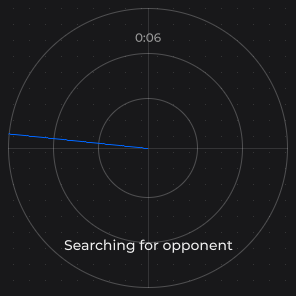
Opponent-search radar — an animated sweep while searching, a flash when a match is found, then a settled state with a status label and timer.
Package
SusGame · Screens (commercial)
Props
| Name | Type | Default | |
|---|---|---|---|
State | Prop<string> | "searching" | |
Label | Prop<string> | DefaultLabel | |
SettleDelayMs | Prop<int> | 1500 | |
TimerTickMs | Prop<int> | 1000 |
Slots
No slots.
Events
| Name | Field | Payload |
|---|---|---|
Settled | OnSettled | — |
Style hooks
USS class contract — override appearance without touching C#. States toggle via these classes:
sus-search-radarsus-search-radar__axissus-search-radar__axis--hsus-search-radar__axis--vsus-search-radar__dotsus-search-radar__flashsus-search-radar__labelsus-search-radar__label--emptysus-search-radar__ringsus-search-radar__sweepsus-search-radar__timersus-search-radar--foundsus-search-radar--searchingsus-search-radar--settled
Usage
xml
<sus:SusSearchRadar />csharp
var radar = new SusSearchRadar();
radar.Label.Value = "Searching for opponent...";
radar.OnSettled += () => { /* start the match */ };
radar.StartSearch();
// later, when the matchmaker answers:
radar.Found();| Prop / API | Role |
|---|---|
State | "searching" (sweep rotates, elapsed timer runs), "found" (dot and flash, timer frozen), "settled" (match locked in). Drives sus-search-radar--searching / --found / --settled |
Label | Status caption under the radar; the caller sets the text per state. Default "Searching for opponent..." (translated through SusGameText). An empty string hides the caption node (sus-search-radar__label--empty) |
SettleDelayMs | Delay from Found() to the automatic found → settled step. Default 1500 |
StartSearch() | (Re)starts a search from any state: timer to 0, sweep resumes |
Found() | Opponent located; no-op outside searching |
OnSettled | Fires once when the found → settled step completes |
Reduce motion
While SusMotion.Reduce is on, the sweep holds still; the elapsed timer keeps running.