
SusInventoryCell
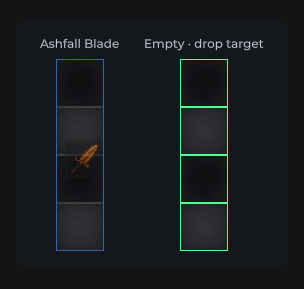
Single bag cell — checker even/odd art, occupied fill, drop-target border highlights. No click API of its own (empty-cell clicks bubble to the grid).
Package
SusGame · Inventory (commercial)
Props
| Name | Type | Default | |
|---|---|---|---|
Occupied | Prop<bool> | false | v-model |
IsEven | Prop<bool> | false | v-model |
Highlighted | Prop<int> | 0 | v-model |
Slots
No slots.
Events
No public events.
Style hooks
USS class contract — override appearance without touching C#. States toggle via these classes:
sus-inventory-cellsus-inventory-cell--evensus-inventory-cell--highlight-candidatesus-inventory-cell--highlight-invalidsus-inventory-cell--highlight-validsus-inventory-cell--occupiedsus-inventory-cell--odd
Usage
Created by SusInventoryGrid during Refresh — prefer the grid / session. Standalone only for chrome demos:
csharp
var cell = new SusInventoryCell();
cell.CellX = 0;
cell.CellY = 1;
cell.IsEven.Value = true;
cell.Occupied.Value = false;
cell.Highlighted.Value = 0; // 0 none · 1 valid · 2 invalid · 3 candidate
xml
<template>
  <sus:SusInventoryCell :Occupied="Occ.Value"
                        :IsEven="Even.Value"
                        :Highlighted="Hl.Value" />
</template>

<script>
public Prop<bool> Occ = new(false);
public Prop<bool> Even = new(true);
public Prop<int> Hl = new(0);
</script>| Prop / API | Role |
|---|---|
Occupied | Solid occupied fill (item sits above) |
IsEven | Checker tile (--even / --odd) |
Highlighted | Drop preview border (0…3) |
CellX / CellY | Grid coordinates (set by parent) |
Notes
- Drop hints are border-only — never tint cell fill under items (USS contract).
- Empty-cell click → parent
SusInventoryGrid.OnEmptyCellClicked(x, y)(click-to-place). ShowCellArt=falseon the shell disables demo tile textures; cells fall back to solid tokens.