
SusLoadingScreenContent
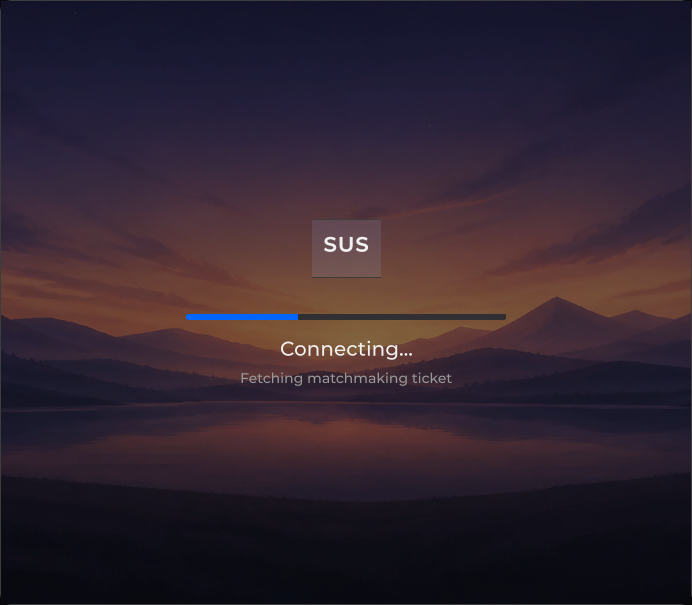
Full-bleed loading — brand banner, spinner and/or linear bar, message + optional subline.
Package
SusGame · Screens (commercial)
Props
| Name | Type | Default | |
|---|---|---|---|
BrandText | Prop<string> | "" | |
Message | Prop<string> | "Loading..." | |
MessageKey | Prop<string> | "" | |
MessageCount | Prop<string> | "" | |
SubMessage | Prop<string> | "" | |
Progress | Prop<float> | 0f | |
ShowSpinner | Prop<bool> | true | |
SpinnerStyle | Prop<string> | "circular" | |
Visible | Prop<bool> | true | |
Map | Prop<bool> | false | |
MapPhase | Prop<string> | "search" | |
ShowBar | Prop<bool> | true | |
RadarPlacement | Prop<string> | "below" | |
RetryText | Prop<string> | "Retry" | |
TelemetryLayout | Prop<string> | "inline" | |
TelemetryReserveRows | Prop<int> | 0 | |
ErrorCountdownSeconds | Prop<int> | 20 | |
ErrorCountdownTickMs | Prop<int> | 1000 | |
Backdrop | Prop<List<SusParallaxLayer>> | [] |
Slots
Events
Style hooks
USS class contract — override appearance without touching C#. States toggle via these classes:
sus-brand__wordsus-loading-screensus-loading-screen__backdropsus-loading-screen__barsus-loading-screen__brandsus-loading-screen__countdownsus-loading-screen__countdown-fillsus-loading-screen__countdown-numsus-loading-screen__errorsus-loading-screen__error-btnsus-loading-screen__error-textsus-loading-screen__error-titlesus-loading-screen__indicatorsus-loading-screen__messagesus-loading-screen__message--swapsus-loading-screen__message-countsus-loading-screen__message-rowsus-loading-screen__radarsus-loading-screen__segmentssus-loading-screen__subsus-loading-screen__sub-keysus-loading-screen__sub-rowsus-loading-screen__sub-row--dangersus-loading-screen__sub-row--livesus-loading-screen__sub-row--oksus-loading-screen__sub-row--reservedsus-loading-screen__sub-row--warnsus-loading-screen__sub-rowssus-loading-screen__sub-rows--columnssus-loading-screen__sub-valsus-loading-screen--visible
Usage
<template>
  <sus:SusLoadingScreenContent
    :BrandText="Brand.Value"
    :Message="Msg.Value"
    :SubMessage="Sub.Value"
    :Progress="Prog.Value"
    :ShowSpinner="Spin.Value"
  />
</template>

<script>
public Prop<string> Brand = new("My Game");
public Prop<string> Msg = new("Loading...");
public Prop<string> Sub = new("");
public Prop<float> Prog = new(0.35f); // 0…1; <0 = indeterminate
public Prop<bool> Spin = new(true);
</script>var loading = new SusLoadingScreenContent();
loading.BrandText.Value = "My Game";
loading.Message.Value = "Connecting…";
loading.SubMessage.Value = "Region EU";
loading.Progress.Value = 0.4f; // shows linear bar
loading.Progress.Value = -1f; // indeterminate → spinner if ShowSpinner
loading.ShowSpinner.Value = true;| Prop / API | Role |
|---|---|
BrandText | Top banner; empty → hidden |
Message | Primary label |
SubMessage | Secondary label; empty → hidden |
Progress | 0…1 → bar %; < 0 → indeterminate mode |
ShowSpinner | When indeterminate, show circular spinner |
BrandBanner | Built banner host |
Backdrop
Backdrop takes a list of SusParallaxLayer (picture, depth, optional USS class) and puts a SusParallaxStack behind the screen:
loading.Backdrop.Value = new List<SusParallaxLayer>
{
    new SusParallaxLayer(Background.FromTexture2D(sky), depth: 4f),
    new SusParallaxLayer(Background.FromTexture2D(skyline), depth: 14f),
};- Null or empty (default) creates nothing: the tree stays as before.
- Set, it adds a first child
sus-loading-screen__backdrop(absolute, ignores picking) holding the stack (BackdropHost/BackdropStack). Emptied again, the node is removed. - The stack follows the pointer over the whole screen, pauses while the application has no focus, and parks while
SusMotion.Reduceis on.
The menu screen SusMenuScreen has the same Backdrop prop.
Indicator, map stage and radar
Every prop here defaults to the look you had before; new classes and nodes appear only when you set one.
| Prop | Values | Effect |
|---|---|---|
SpinnerStyle | "circular" (default) | "spinner" | "dual" | spinner / dual: a SusSpinner (size lg, Dual for dual) replaces the ring while Progress is negative; the ring is hidden by class |
MapPhase | "search" (default) | "map" | map adds sus-loading-screen--map-stage while Map is on, so a skin can style the map stage apart from the search |
ShowBar | true (default) | false | false hides the progress bar at any Progress |
RadarPlacement | "below" (default) | "above" | above: the search radar stands right before the message |
RetryText | "Retry" | Caption of the retry button of ShowError |
While Progress is negative only the busy indicator shows: no empty progress bar under it. SearchRadar.Label set to "" hides the radar caption.
Telemetry rows
SetTelemetry(rows) updates the rows in place: a row is identified by its key (plus the repeat index of that key), keeps its element, and changes only its value and state class. New keys are inserted, missing keys are removed.
| Prop | Values | Effect |
|---|---|---|
TelemetryLayout | "inline" (default) | "columns" | columns (sus-loading-screen__sub-rows--columns): keys right-aligned and values left-aligned on one axis, so keys stay put when values change length |
TelemetryReserveRows | 0 (default) or N | At least N rows; missing ones are hidden placeholders of the same height (__sub-row--reserved), so the block does not grow while rows arrive |
Message phase and counter
| Prop | Effect |
|---|---|
MessageKey | Empty (default): __message--swap on every Message change, as before. Set: the swap class only when the key changes |
MessageCount | A counter next to the message, e.g. "12/80". The first non-empty value builds __message-row + __message-count; a counter change never swaps |
loading.MessageKey.Value = "assets";
loading.Message.Value = "Loading assets";
loading.MessageCount.Value = "12/80";   // later "13/80": no swap
SusLoadingFlowScreen exposes MessageKey and MessageCount; Reset() clears both.
Notes
- Determinate path clamps
Progressto 0…1 and maps to bar 0…100. - Indeterminate hides the bar; spinner visibility also needs
ShowSpinner=true. - Distinct from kit
MigratedLoadingScreen(different package / props).